

Company
교육 철학

imGuizmo 추가 및 간단한 예제

개요

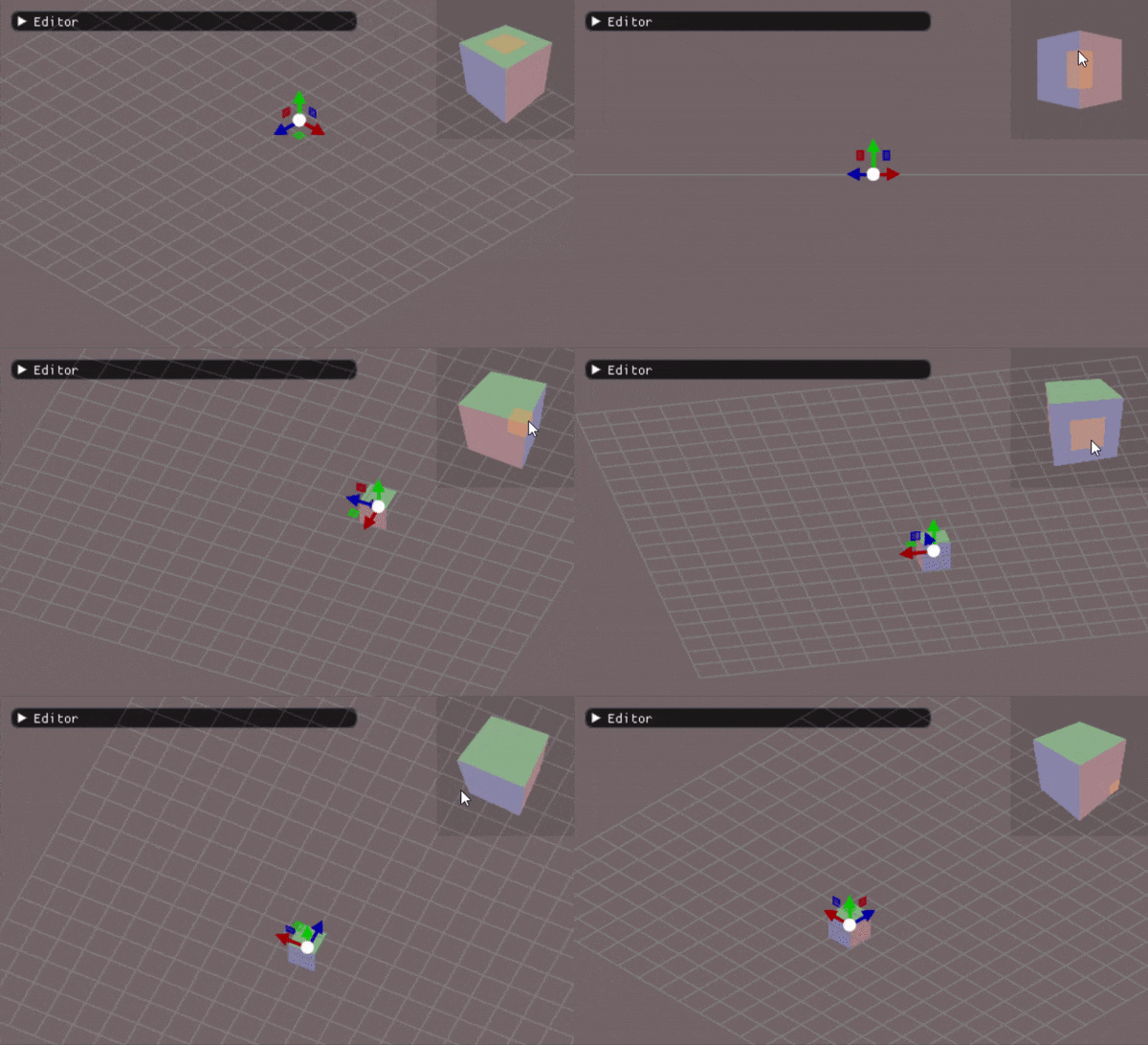
ImGuizmo는 ImGui와 통합되어 작동하는 강력한 3D 조작 도구입니다. 게임 에디터에서 씬 내 오브젝트의 Transform(위치, 회전, 스케일)을 시각적이고 직관적으로 편집할 수 있게 해주는 필수 도구로, Unity나 Unreal Engine의 기즈모 시스템과 유사한 기능을 제공합니다.

ImGuizmo의 필요성

생산성 향상
수치 입력 대신 시각적 조작으로 빠른 배치 작업
실시간 피드백으로 즉각적인 결과 확인
직관적인 인터랙션으로 학습 곡선 최소화
정밀한 제어
마우스 드래그로 부드러운 변환
그리드 스냅 기능으로 정확한 정렬
축별 독립적인 조작
전문적인 워크플로우
업계 표준 에디터와 동일한 UX 제공
아티스트와 디자이너에게 친숙한 인터페이스
레벨 디자인 및 씬 구성 효율 극대화

1. ImGuizmo 설치 및 프로젝트 설정

다운로드

ImGuizmo는 오픈소스 프로젝트로, GitHub에서 무료로 제공됩니다.
git clone https://github.com/CedricGuillemet/ImGuizmo.git
Shell
복사
저장소 구조
ImGuizmo.h: 헤더 파일
ImGuizmo.cpp: 구현 파일
예제 및 데모 코드 포함

프로젝트 통합

필수 요구사항
ImGui가 이미 프로젝트에 통합되어 있어야 함
C++11 이상의 컴파일러
3D 렌더링 파이프라인 (DirectX, OpenGL, Vulkan 등)
파일 추가
1.
ImGuizmo.hImGuizmo.cpp를 프로젝트 소스에 복사
2.
Include 경로에 ImGuizmo 디렉토리 추가
3.
빌드 시스템에 cpp 파일 추가

빌드 시스템 설정

CMake 예시
Visual Studio 프로젝트 설정
1.
프로젝트 속성 → C/C++ → 일반 → 추가 포함 디렉터리에 ImGuizmo 경로 추가
2.
소스 파일에 ImGuizmo.cpp 추가
3.
빌드 후 ImGui와 함께 사용

2. ImGuizmo 초기화 및 기본 설정

프레임 준비

ImGuizmo는 매 프레임마다 초기화가 필요합니다. ImGui의 렌더링 루프 내에서 호출해야 합니다.
// 에디터 메인 루프 void EditorApplication::OnGUI() { // ImGui 프레임 시작 ImGui::NewFrame(); // ImGuizmo 프레임 시작 (필수!) ImGuizmo::BeginFrame(); // 에디터 UI 렌더링 RenderEditorWindows(); // ImGui 렌더링 완료 ImGui::Render(); ImGui_ImplDX11_RenderDrawData(ImGui::GetDrawData()); }
C++
복사
BeginFrame()의 역할
이전 프레임의 상태 초기화
입력 이벤트 처리 준비
기즈모 내부 캐시 업데이트

뷰포트 설정

기즈모가 표시될 화면 영역을 지정합니다.
void SceneWindow::RenderGizmo() { // 현재 윈도우의 위치와 크기 가져오기 ImVec2 windowPos = ImGui::GetWindowPos(); ImVec2 windowSize = ImGui::GetWindowSize(); // 기즈모 렌더링 영역 설정 ImGuizmo::SetRect( windowPos.x, // 시작 X 좌표 windowPos.y, // 시작 Y 좌표 windowSize.x, // 너비 windowSize.y // 높이 ); }
C++
복사
주의사항
SetRect()는 매 프레임 호출 필요 (윈도우 크기 변경 대응)
윈도우 패딩이나 타이틀 바를 고려한 정확한 영역 설정 필요
여러 뷰포트가 있는 경우 각각 설정

화면 좌표와 뷰포트

// 타이틀바 및 패딩을 제외한 정확한 뷰포트 계산 ImVec2 viewportPanelPos = ImGui::GetCursorScreenPos(); ImVec2 viewportPanelSize = ImGui::GetContentRegionAvail(); ImGuizmo::SetRect( viewportPanelPos.x, viewportPanelPos.y, viewportPanelSize.x, viewportPanelSize.y );
C++
복사

3. 기즈모 조작 모드

ImGuizmo는 세 가지 기본 조작 모드를 제공합니다.

TRANSLATE (이동 모드)

특징
3개의 축 화살표로 표시
각 축을 따라 독립적으로 이동
평면 핸들로 2축 동시 이동 가능
사용 시나리오
오브젝트 배치 및 위치 조정
레벨 디자인 시 에셋 배치
카메라 위치 조정
시각적 표현
X축: 빨강 화살표
Y축: 초록 화살표
Z축: 파랑 화살표
XY, YZ, XZ 평면: 색상 조합 사각형
ImGuizmo::OPERATION operation = ImGuizmo::TRANSLATE; ImGuizmo::Manipulate(view, projection, operation, mode, matrix);
C++
복사

ROTATE (회전 모드)

특징
3개의 원형 링으로 표시
각 축을 중심으로 회전
자유 회전(Screen space) 지원
사용 시나리오
오브젝트 방향 조정
캐릭터나 카메라 시선 방향 설정
각도 기반 정렬
시각적 표현
X축: 빨강 원
Y축: 초록 원
Z축: 파랑 원
외곽 원: 스크린 공간 자유 회전
ImGuizmo::OPERATION operation = ImGuizmo::ROTATE; ImGuizmo::Manipulate(view, projection, operation, mode, matrix);
C++
복사
회전 방식
마우스 드래그 각도에 비례한 회전
부드러운 회전 보간
짐벌 락 방지 (쿼터니언 기반)

SCALE (크기 조절 모드)

특징
3개의 축 큐브로 표시
각 축별 독립적인 스케일링
중앙 큐브로 균등 스케일링
사용 시나리오
오브젝트 크기 조정
비율 변경 (늘이기/줄이기)
충돌 영역 크기 조정
시각적 표현
X축: 빨강 라인과 큐브
Y축: 초록 라인과 큐브
Z축: 파랑 라인과 큐브
중앙: 흰색 큐브 (균등 스케일)
ImGuizmo::OPERATION operation = ImGuizmo::SCALE; ImGuizmo::Manipulate(view, projection, operation, mode, matrix);
C++
복사
Non-uniform vs Uniform Scale
축별 스케일: 각 축 핸들 조작
균등 스케일: 중앙 큐브 조작 (비율 유지)

복합 모드

// 여러 모드를 비트 플래그로 결합 ImGuizmo::OPERATION operation = ImGuizmo::TRANSLATE | ImGuizmo::ROTATE | ImGuizmo::SCALE;
C++
복사
Universal Mode
모든 변환을 하나의 기즈모에서 수행
축소된 UI로 동시 표시
고급 사용자를 위한 빠른 워크플로우

4. 좌표계 모드

WORLD (월드 좌표계)

개념
절대 좌표계 기준으로 변환
축이 항상 고정된 방향 유지
객체의 회전과 무관
장점
씬 전체의 표준 방향으로 직관적 배치
바닥이나 벽 같은 월드 기준 정렬에 유용
여러 오브젝트를 일관된 방향으로 조작
사용 예시
ImGuizmo::MODE mode = ImGuizmo::WORLD; ImGuizmo::Manipulate(view, projection, operation, mode, matrix);
C++
복사
적합한 상황
건물, 지형 등 월드에 고정된 오브젝트 배치
그리드 기반 레벨 디자인
절대 방향이 중요한 작업

LOCAL (로컬 좌표계)

개념
오브젝트 자체의 좌표계 기준
축이 오브젝트의 회전에 따라 함께 회전
상대적인 변환
장점
오브젝트의 방향에 맞춰 자연스러운 조작
캐릭터의 "앞", "위", "옆" 등 상대 방향으로 이동
복잡하게 회전된 오브젝트 편집에 유용
사용 예시
ImGuizmo::MODE mode = ImGuizmo::LOCAL; ImGuizmo::Manipulate(view, projection, operation, mode, matrix);
C++
복사
적합한 상황
캐릭터나 차량 같은 동적 오브젝트 조작
부모-자식 계층 구조에서 자식 오브젝트 편집
오브젝트의 로컬 방향이 중요한 작업

모드 전환 UI

// UI에서 좌표계 모드 토글 static ImGuizmo::MODE currentMode = ImGuizmo::WORLD; if (ImGui::RadioButton("World", currentMode == ImGuizmo::WORLD)) currentMode = ImGuizmo::WORLD; ImGui::SameLine(); if (ImGui::RadioButton("Local", currentMode == ImGuizmo::LOCAL)) currentMode = ImGuizmo::LOCAL;
C++
복사

5. 행렬 처리 및 변환 적용

행렬 형식

ImGuizmo는 4x4 변환 행렬을 사용하며, 열 우선(Column-major) 형식을 기대합니다.
행렬 구조
// 4x4 Transform Matrix (Column-major) float matrix[16] = { // Column 0 (Right) // Column 1 (Up) // Column 2 (Forward) // Column 3 (Position) right.x, right.y, right.z, 0.0f, up.x, up.y, up.z, 0.0f, forward.x,forward.y,forward.z,0.0f, pos.x, pos.y, pos.z, 1.0f };
C++
복사

카메라 행렬 준비

// 카메라 뷰 행렬 (World → View 변환) Matrix4x4 viewMatrix = camera->GetViewMatrix(); // 카메라 투영 행렬 (View → Clip 변환) Matrix4x4 projectionMatrix = camera->GetProjectionMatrix(); // float 배열로 변환 (ImGuizmo 요구 형식) float* viewPtr = viewMatrix.GetPtr(); float* projPtr = projectionMatrix.GetPtr();
C++
복사
주의사항
DirectX는 행 우선(Row-major), OpenGL은 열 우선(Column-major)
필요시 전치(Transpose) 수행
동차 좌표계(Homogeneous coordinates) 사용

오브젝트 행렬 가져오기

GameObject* selectedObject = GetSelectedObject(); Transform* transform = selectedObject->GetComponent<Transform>(); // Transform 컴포넌트에서 월드 행렬 추출 Matrix4x4 worldMatrix = transform->GetWorldMatrix(); float modelMatrix[16]; memcpy(modelMatrix, worldMatrix.GetPtr(), sizeof(float) * 16);
C++
복사

Manipulate 함수 호출

ImGuizmo::Manipulate( viewPtr, // 뷰 행렬 (const float*) projPtr, // 투영 행렬 (const float*) operation, // 조작 모드 (TRANSLATE/ROTATE/SCALE) mode, // 좌표계 모드 (WORLD/LOCAL) modelMatrix, // 입출력: 모델 행렬 (float*) nullptr, // 선택적: 델타 행렬 nullptr, // 선택적: 스냅 값 배열 nullptr, // 선택적: 경계 상자 nullptr // 선택적: 경계 상자 스냅 );
C++
복사
반환값
bool: 기즈모가 조작되었는지 여부
true일 때만 modelMatrix가 수정됨

변환 결과 적용

// 기즈모 조작 확인 if (ImGuizmo::IsUsing()) { // 수정된 행렬을 Transform 컴포넌트에 적용 Matrix4x4 newWorldMatrix(modelMatrix); transform->SetWorldMatrix(newWorldMatrix); // 또는 Position, Rotation, Scale 개별 추출 Vector3 position, rotation, scale; ImGuizmo::DecomposeMatrixToComponents( modelMatrix, position.GetPtr(), rotation.GetPtr(), scale.GetPtr() ); transform->SetPosition(position); transform->SetRotation(rotation); transform->SetScale(scale); }
C++
복사

행렬 분해 및 재구성

// 행렬 → 컴포넌트 분해 float translation[3], rotation[3], scale[3]; ImGuizmo::DecomposeMatrixToComponents( modelMatrix, translation, rotation, // Euler angles (degrees) scale ); // 컴포넌트 → 행렬 재구성 ImGuizmo::RecomposeMatrixFromComponents( translation, rotation, scale, modelMatrix );
C++
복사

6. 고급 기능

스냅(Snap) 기능

객체를 그리드나 특정 각도 단위로 정렬합니다.
이동 스냅
// 1 유닛 단위로 스냅 float snapTranslation[3] = { 1.0f, 1.0f, 1.0f }; ImGuizmo::Manipulate( view, proj, ImGuizmo::TRANSLATE, mode, matrix, nullptr, snapTranslation // 스냅 값 배열 );
C++
복사
회전 스냅
// 15도 단위로 스냅 float snapRotation[3] = { 15.0f, 15.0f, 15.0f }; ImGuizmo::Manipulate( view, proj, ImGuizmo::ROTATE, mode, matrix, nullptr, snapRotation );
C++
복사
스케일 스냅
// 0.5 배수 단위로 스냅 float snapScale[3] = { 0.5f, 0.5f, 0.5f }; ImGuizmo::Manipulate( view, proj, ImGuizmo::SCALE, mode, matrix, nullptr, snapScale );
C++
복사
조건부 스냅 (키 입력 기반)
float* snapValues = nullptr; // Ctrl 키를 누르고 있을 때만 스냅 활성화 if (ImGui::GetIO().KeyCtrl) { static float snapValue = 1.0f; snapValues = &snapValue; } ImGuizmo::Manipulate(view, proj, operation, mode, matrix, nullptr, snapValues);
C++
복사

경계 상자 (Bounding Box)

오브젝트의 크기를 시각적으로 표시합니다.
// 오브젝트의 AABB 계산 float bounds[6] = { -1.0f, -1.0f, -1.0f, // Min (X, Y, Z) 1.0f, 1.0f, 1.0f // Max (X, Y, Z) }; float boundsSnap[3] = { 0.1f, 0.1f, 0.1f }; ImGuizmo::Manipulate( view, proj, operation, mode, matrix, nullptr, nullptr, bounds, // 경계 상자 boundsSnap // 경계 상자 스냅 );
C++
복사

델타 행렬 추출

변환의 증분(Delta)만 가져올 수 있습니다.
float deltaMatrix[16]; ImGuizmo::Manipulate( view, proj, operation, mode, matrix, deltaMatrix // 이전 프레임 대비 변화량 ); // 델타를 여러 오브젝트에 동시 적용 (멀티 선택) for (auto& obj : selectedObjects) { Matrix4x4 current = obj->GetWorldMatrix(); Matrix4x4 delta(deltaMatrix); Matrix4x4 newMatrix = current * delta; obj->SetWorldMatrix(newMatrix); }
C++
복사

상태 확인 함수

// 현재 기즈모가 사용 중인지 (드래그 중) if (ImGuizmo::IsUsing()) { // 기즈모 조작 중 - 다른 입력 무시 DisableOtherInputs(); } // 마우스가 기즈모 위에 있는지 (호버) if (ImGuizmo::IsOver()) { // 호버 상태 - 툴팁 표시 가능 ShowGizmoTooltip(); } // 특정 축이 사용 중인지 if (ImGuizmo::IsOver(ImGuizmo::TRANSLATE_X)) { // X축 조작 중 }
C++
복사

뷰 조작 큐브

씬 뷰의 카메라 방향을 빠르게 변경하는 큐브 UI입니다.
// 우측 상단에 뷰 큐브 표시 ImGuizmo::ViewManipulate( viewMatrixPtr, // 입출력: 뷰 행렬 cameraDistance, // 카메라와 타겟 간 거리 ImVec2(windowPos.x + windowSize.x - 128, windowPos.y), // 위치 ImVec2(128, 128), // 크기 0x10101010 // 배경색 (RGBA) );
C++
복사
기능
큐브 면 클릭으로 정면/측면/위 시점 전환
드래그로 자유 회전
더블클릭으로 원래 시점 복원

7. 실전 통합 예제

완전한 에디터 윈도우 구현

class SceneViewWindow : public EditorWindow { private: // 기즈모 상태 ImGuizmo::OPERATION mOperation = ImGuizmo::TRANSLATE; ImGuizmo::MODE mMode = ImGuizmo::WORLD; bool mUseSnap = false; float mSnapValue = 1.0f; public: void OnGUI() override { // 윈도우 시작 ImGui::Begin("Scene View"); // 툴바: 기즈모 모드 선택 RenderToolbar(); // 씬 렌더링 영역 ImVec2 viewportPos = ImGui::GetCursorScreenPos(); ImVec2 viewportSize = ImGui::GetContentRegionAvail(); // 씬 텍스처 표시 ImGui::Image(sceneRenderTexture, viewportSize); // 기즈모 렌더링 RenderGizmo(viewportPos, viewportSize); // 뷰 조작 큐브 RenderViewCube(viewportPos, viewportSize); ImGui::End(); } private: void RenderToolbar() { // 조작 모드 버튼 if (ImGui::Button("Translate")) mOperation = ImGuizmo::TRANSLATE; ImGui::SameLine(); if (ImGui::Button("Rotate")) mOperation = ImGuizmo::ROTATE; ImGui::SameLine(); if (ImGui::Button("Scale")) mOperation = ImGuizmo::SCALE; ImGui::SameLine(); ImGui::Separator(); ImGui::SameLine(); // 좌표계 모드 토글 if (ImGui::Button(mMode == ImGuizmo::WORLD ? "World" : "Local")) { mMode = (mMode == ImGuizmo::WORLD) ? ImGuizmo::LOCAL : ImGuizmo::WORLD; } ImGui::SameLine(); // 스냅 토글 및 값 설정 ImGui::Checkbox("Snap", &mUseSnap); if (mUseSnap) { ImGui::SameLine(); ImGui::SetNextItemWidth(100); if (mOperation == ImGuizmo::TRANSLATE) ImGui::DragFloat("##snap", &mSnapValue, 0.1f, 0.1f, 10.0f, "%.1f"); else if (mOperation == ImGuizmo::ROTATE) ImGui::DragFloat("##snap", &mSnapValue, 1.0f, 1.0f, 90.0f, "%.0f°"); else if (mOperation == ImGuizmo::SCALE) ImGui::DragFloat("##snap", &mSnapValue, 0.05f, 0.05f, 2.0f, "%.2f"); } } void RenderGizmo(ImVec2 viewportPos, ImVec2 viewportSize) { // 선택된 오브젝트 확인 GameObject* selected = SelectionManager::GetSelectedObject(); if (!selected) return; // 기즈모 렌더링 영역 설정 ImGuizmo::SetRect(viewportPos.x, viewportPos.y, viewportSize.x, viewportSize.y); // 카메라 행렬 Camera* camera = GetActiveCamera(); Matrix4x4 view = camera->GetViewMatrix(); Matrix4x4 proj = camera->GetProjectionMatrix(); // 오브젝트 변환 행렬 Transform* transform = selected->GetComponent<Transform>(); Matrix4x4 model = transform->GetWorldMatrix(); float modelMatrix[16]; memcpy(modelMatrix, model.GetPtr(), sizeof(float) * 16); // 스냅 설정 float* snapPtr = nullptr; float snap[3] = { mSnapValue, mSnapValue, mSnapValue }; if (mUseSnap) snapPtr = snap; // 기즈모 조작 ImGuizmo::Manipulate( view.GetPtr(), proj.GetPtr(), mOperation, mMode, modelMatrix, nullptr, snapPtr ); // 변환 적용 if (ImGuizmo::IsUsing()) { // 행렬 분해 Vector3 position, rotation, scale; ImGuizmo::DecomposeMatrixToComponents( modelMatrix, &position.x, &rotation.x, &scale.x ); // Transform 업데이트 transform->SetPosition(position); transform->SetRotation(rotation); transform->SetScale(scale); // Undo/Redo 시스템에 등록 UndoSystem::RecordTransform(transform); } } void RenderViewCube(ImVec2 viewportPos, ImVec2 viewportSize) { Camera* camera = GetActiveCamera(); Matrix4x4 view = camera->GetViewMatrix(); float distance = camera->GetDistance(); // 우측 상단에 128x128 크기로 표시 ImGuizmo::ViewManipulate( view.GetPtr(), distance, ImVec2(viewportPos.x + viewportSize.x - 128, viewportPos.y), ImVec2(128, 128), 0x10101010 ); // 뷰가 변경되었다면 카메라에 적용 camera->SetViewMatrix(view); } };
C++
복사

키보드 단축키 통합

void HandleGizmoShortcuts() { ImGuiIO& io = ImGui::GetIO(); // Q: 기즈모 끄기 if (ImGui::IsKeyPressed(ImGuiKey_Q)) mOperation = ImGuizmo::NONE; // W: 이동 모드 if (ImGui::IsKeyPressed(ImGuiKey_W)) mOperation = ImGuizmo::TRANSLATE; // E: 회전 모드 if (ImGui::IsKeyPressed(ImGuiKey_E)) mOperation = ImGuizmo::ROTATE; // R: 스케일 모드 if (ImGui::IsKeyPressed(ImGuiKey_R)) mOperation = ImGuizmo::SCALE; // Ctrl 키로 스냅 토글 mUseSnap = io.KeyCtrl; }
C++
복사

멀티 오브젝트 선택 지원

void RenderMultiSelectGizmo() { auto& selectedObjects = SelectionManager::GetSelectedObjects(); if (selectedObjects.empty()) return; // 모든 선택된 오브젝트의 중심점 계산 Vector3 center = CalculateSelectionCenter(selectedObjects); // 중심점 기준 변환 행렬 생성 Matrix4x4 pivotMatrix = Matrix4x4::CreateTranslation(center); float modelMatrix[16]; memcpy(modelMatrix, pivotMatrix.GetPtr(), sizeof(float) * 16); // 기즈모 조작 ImGuizmo::Manipulate(view, proj, mOperation, mMode, modelMatrix); if (ImGuizmo::IsUsing()) { // 델타 변환 계산 Matrix4x4 newPivot(modelMatrix); Matrix4x4 delta = newPivot * pivotMatrix.Inverse(); // 모든 선택 오브젝트에 델타 적용 for (auto& obj : selectedObjects) { Transform* t = obj->GetComponent<Transform>(); Matrix4x4 newWorld = t->GetWorldMatrix() * delta; t->SetWorldMatrix(newWorld); } } }
C++
복사

8. 최적화 및 모범 사례

성능 최적화

조건부 렌더링
// 오브젝트가 선택되었을 때만 기즈모 렌더링 if (SelectionManager::HasSelection()) { RenderGizmo(); }
C++
복사
뷰포트 영역 체크
// 기즈모가 화면에 보이지 않으면 스킵 if (!IsGizmoVisible()) return;
C++
복사
입력 처리 최적화
// 기즈모 사용 중일 때 다른 입력 차단 if (ImGuizmo::IsUsing()) { io.WantCaptureMouse = true; io.WantCaptureKeyboard = true; }
C++
복사

사용자 경험 향상

시각적 피드백
// 기즈모 사용 중일 때 하이라이트 if (ImGuizmo::IsUsing()) { ImGui::GetForegroundDrawList()->AddRect( viewportPos, ImVec2(viewportPos.x + viewportSize.x, viewportPos.y + viewportSize.y), IM_COL32(255, 255, 0, 255), 0.0f, 0, 2.0f ); }
C++
복사
수치 표시
// 조작 중 변환 값 표시 if (ImGuizmo::IsUsing()) { Vector3 pos, rot, scale; ImGuizmo::DecomposeMatrixToComponents( modelMatrix, &pos.x, &rot.x, &scale.x ); ImGui::SetNextWindowPos(ImVec2(viewportPos.x + 10, viewportPos.y + 10)); ImGui::Begin("Transform", nullptr, ImGuiWindowFlags_NoDecoration | ImGuiWindowFlags_AlwaysAutoResize); if (mOperation == ImGuizmo::TRANSLATE) ImGui::Text("Position: %.2f, %.2f, %.2f", pos.x, pos.y, pos.z); else if (mOperation == ImGuizmo::ROTATE) ImGui::Text("Rotation: %.1f°, %.1f°, %.1f°", rot.x, rot.y, rot.z); else if (mOperation == ImGuizmo::SCALE) ImGui::Text("Scale: %.2f, %.2f, %.2f", scale.x, scale.y, scale.z); ImGui::End(); }
C++
복사

Undo/Redo 통합

class TransformCommand : public ICommand { private: Transform* mTransform; Matrix4x4 mOldMatrix; Matrix4x4 mNewMatrix; public: TransformCommand(Transform* t, const Matrix4x4& oldMat, const Matrix4x4& newMat) : mTransform(t), mOldMatrix(oldMat), mNewMatrix(newMat) {} void Execute() override { mTransform->SetWorldMatrix(mNewMatrix); } void Undo() override { mTransform->SetWorldMatrix(mOldMatrix); } }; // 기즈모 사용 시 커맨드 생성 static Matrix4x4 beforeTransform; static bool isTransforming = false; if (ImGuizmo::IsUsing() && !isTransforming) { // 조작 시작 - 초기 상태 저장 beforeTransform = transform->GetWorldMatrix(); isTransforming = true; } else if (!ImGuizmo::IsUsing() && isTransforming) { // 조작 종료 - Undo 스택에 추가 Matrix4x4 afterTransform = transform->GetWorldMatrix(); auto command = std::make_unique<TransformCommand>( transform, beforeTransform, afterTransform ); UndoSystem::Execute(std::move(command)); isTransforming = false; }
C++
복사

에러 처리

// 유효성 검사 if (!view.IsValid() || !proj.IsValid()) { LogError("Invalid camera matrices for ImGuizmo"); return; } if (!modelMatrix || !transform) { LogError("Invalid transform data for ImGuizmo"); return; } // NaN 체크 if (std::isnan(modelMatrix[0]) || std::isnan(modelMatrix[12])) { LogError("NaN detected in model matrix"); transform->ResetToIdentity(); return; }
C++
복사

9. 문제 해결

기즈모가 보이지 않을 때

체크리스트
1.
ImGuizmo::BeginFrame() 호출 확인
2.
ImGuizmo::SetRect() 호출 및 영역 확인
3.
뷰/투영 행렬 유효성 확인
4.
모델 행렬이 유효한 변환인지 확인
5.
뷰포트가 씬 렌더링 텍스처와 겹치는지 확인

기즈모가 이상한 위치에 표시될 때

원인 및 해결
행렬 전치 문제: DirectX와 OpenGL의 행렬 형식 차이
// DirectX 행렬을 OpenGL 형식으로 전치 Matrix4x4 transposed = matrix.Transpose();
C++
복사
좌표계 불일치: Y-up vs Z-up
// Y-up에서 Z-up으로 변환 Matrix4x4 coordConversion = Matrix4x4::CreateRotationX(-90.0f);
C++
복사

기즈모 조작이 부자연스러울 때

스냅 값 조정
// 너무 큰 스냅 값은 부드러운 조작 방해 float snapValue = 0.1f; // 작은 값으로 시작
C++
복사
감도 조정
// ImGuizmo는 내부 감도를 가지지만, 델타 행렬에 스케일 적용 가능 Matrix4x4 delta(deltaMatrix); delta = delta * sensitivity; // 0.5 ~ 2.0 범위
C++
복사

결론

ImGuizmo는 게임 에디터에서 직관적이고 전문적인 오브젝트 조작 인터페이스를 구현하는 핵심 도구입니다.

주요 장점

빠른 통합
단 몇 줄의 코드로 Unity/Unreal 수준의 기즈모 구현
ImGui 생태계와의 완벽한 호환성
최소한의 의존성
강력한 기능
3가지 조작 모드 (이동/회전/스케일)
2가지 좌표계 (월드/로컬)
스냅, 경계 상자, 뷰 큐브 등 고급 기능
높은 확장성
델타 행렬을 통한 멀티 선택 지원
Undo/Redo 시스템 통합 용이
커스텀 시각화 추가 가능
전문적인 워크플로우
업계 표준 에디터와 동일한 UX
키보드 단축키 지원
실시간 피드백 제공
본 가이드의 예제 코드와 패턴을 활용하여, 여러분의 게임 엔진 에디터에 강력하고 사용자 친화적인 오브젝트 조작 시스템을 구축할 수 있습니다. ImGuizmo는 작은 인디 프로젝트부터 대규모 상용 엔진까지 폭넓게 활용되고 있으며, 지속적으로 업데이트되고 있는 활발한 오픈소스 프로젝트입니다.