



Abstract

레퍼런스 풀은 new 를 대신하는 재활용 통입니다. 잠깐 쓰고 버리는 작은 C# 객체를 new 로 만들면 매번 가비지가 생기는데, ReferencePool.Acquire<T>() 로 꺼내고 Release() 로 돌려놓으면 같은 객체를 계속 돌려 씁니다. GameObject 가 아니라 순수 C# 클래스용이라는 점이 오브젝트 풀과의 차이입니다.
실무에서 필요한 순간
•
이벤트 인자 — 점수가 오를 때마다, 피격될 때마다 하나씩 만들어진다
•
엔티티에 넘기는 초기화 데이터 — 스폰마다 하나씩 만들어진다
•
네트워크 패킷, 작업(Task) 객체처럼 프레임마다 생겼다 사라지는 것
ToyboxNightmare 에서의 실제 사용 — 두 가지 패턴
예제에서 ReferencePool 을 직접 부르는 곳은 전부 아래 둘 중 하나입니다.
① 이벤트 인자 — 만드는 쪽이 Acquire, 프레임워크가 Release
public class ScoreChangedEventArgs : GameEventArgs
{
public static readonly int EventId = typeof(ScoreChangedEventArgs).GetHashCode();
public override int Id => EventId;
public int Score { get; private set; }
public int Delta { get; private set; }
public static ScoreChangedEventArgs Create(int score, int delta)
{
var args = ReferencePool.Acquire<ScoreChangedEventArgs>(); // new 대신
args.Score = score;
args.Delta = delta;
return args;
}
public override void Clear() // 풀로 돌아갈 때 불린다
{
Score = 0;
Delta = 0;
}
}
// 발행
events.Fire(this, ScoreChangedEventArgs.Create(mScore, delta));
C#
복사
Fire 로 넘긴 인자는 모든 핸들러가 처리한 뒤 이벤트 시스템이 알아서 반납합니다. 핸들러 안에서 직접 Release 하면 이중 반납이 됩니다. 같은 이유로 핸들러 밖에서 쓰려고 인자 객체를 멤버에 보관해도 안 됩니다 — 다음 프레임에는 다른 이벤트의 값이 들어 있습니다. 필요한 값만 복사해 두세요.
② 엔티티 데이터 — 만드는 쪽이 Acquire, 엔티티가 사라질 때 게임 코드가 Release
// 스폰할 때
EnemyData data = EnemyData.Create(id, typeId, stats, position); // 내부에서 Acquire
entityComponent.ShowEntity(id, typeof(Enemy), stats.AssetName, "Enemy", data);
// 회수될 때 (EntityLogicBase.OnHide)
ReferencePool.Release(data);
C#
복사
이쪽은 프레임워크가 대신 반납해 주지 않습니다. 예제는 모든 엔티티의 공통 부모 EntityLogicBase 의 OnHide 에서 한 번 반납하고, ShowEntity 가 실패해 OnHide 가 불리지 않는 경로는 실패 이벤트 핸들러에서 따로 반납합니다.
새 풀링 클래스를 만들 때 지킬 것
규칙 | 어기면 |
IReference 구현 + public 기본 생성자 | Acquire<T>() 의 new() 제약에 걸려 컴파일 에러 |
Clear() 에서 모든 필드를 초기값으로 | 다음에 꺼낸 쪽이 이전 사용자의 값을 그대로 본다. 필드를 추가하고 Clear 를 안 고치는 실수가 가장 흔하다 |
Acquire 1회  Release 1회 | 안 돌려주면 풀링 효과가 없고, 두 번 돌려주면 Strict Check 가 켜져 있을 때 예외 |
Release 한 뒤에는 그 참조를 쓰지 않는다 | 이미 다른 곳에서 꺼내 쓰고 있을 수 있다 |
생성은 Create(...) 정적 팩토리로 감싼다 | Acquire 후 필드 채우기를 빠뜨린 객체가 돌아다닌다 |

이 에디션에서 다른 점: 본문의 "Editor Inspector" 절(ReferencePoolComponentInspector, CSV 내보내기)은 이 에디션에 없습니다. 에디터 확장이 빠져 있기 때문입니다. 풀 통계는 런타임 Debugger 창의 Reference Pool 탭에서 볼 수 있고, Strict Check 는 GameFramework.prefab 의 Reference Pool 오브젝트에서 Enable Strict Check 필드로 설정합니다. 개발 중에는 켜 두세요 — 이중 반납을 그 자리에서 잡아 줍니다.
Reference Pooling (레퍼런스 풀링)
Relevant source files (관련 소스 파일)
•
Scripts/Editor/Inspector/ObjectPoolComponentInspector.cs
•
Scripts/Editor/Inspector/ReferencePoolComponentInspector.cs
•
Scripts/Editor/Inspector/ReferencePoolComponentInspector.cs.meta
•
Scripts/Runtime/Debugger/DebuggerActiveWindowType.cs
•
Scripts/Runtime/Debugger/DebuggerComponent.ObjectPoolInformationWindow.cs
•
Scripts/Runtime/Debugger/DebuggerComponent.ReferencePoolInformationWindow.cs
•
Scripts/Runtime/Debugger/DebuggerComponent.ReferencePoolInformationWindow.cs.meta
•
Scripts/Runtime/Debugger/DebuggerComponent.RuntimeMemoryInformationWindow.cs
•
Scripts/Runtime/Debugger/DebuggerComponent.RuntimeMemorySummaryWindow.cs
•
Scripts/Runtime/Debugger/DebuggerComponent.cs
•
Scripts/Runtime/ReferencePool.meta
•
Scripts/Runtime/ReferencePool/ReferencePoolComponent.cs
•
Scripts/Runtime/ReferencePool/ReferencePoolComponent.cs.meta
•
Scripts/Runtime/ReferencePool/ReferenceStrictCheckType.cs
•
Scripts/Runtime/ReferencePool/ReferenceStrictCheckType.cs.meta
Purpose and Overview (목적 및 개요)
Reference Pooling은 Game Framework의 메모리 최적화 시스템으로, C# 참조 타입 객체를 효율적으로 관리합니다.
•
Object Pooling: Unity의 GameObject 인스턴스 관리
•
Reference Pooling: 가벼운 C# 클래스 관리
 즉, GameObject가 아닌 순수 C# 객체를 풀링하여 생성/삭제 대신 재사용함으로써 GC 오버헤드를 줄이고 성능을 향상시킵니다.
System Architecture (시스템 아키텍처)
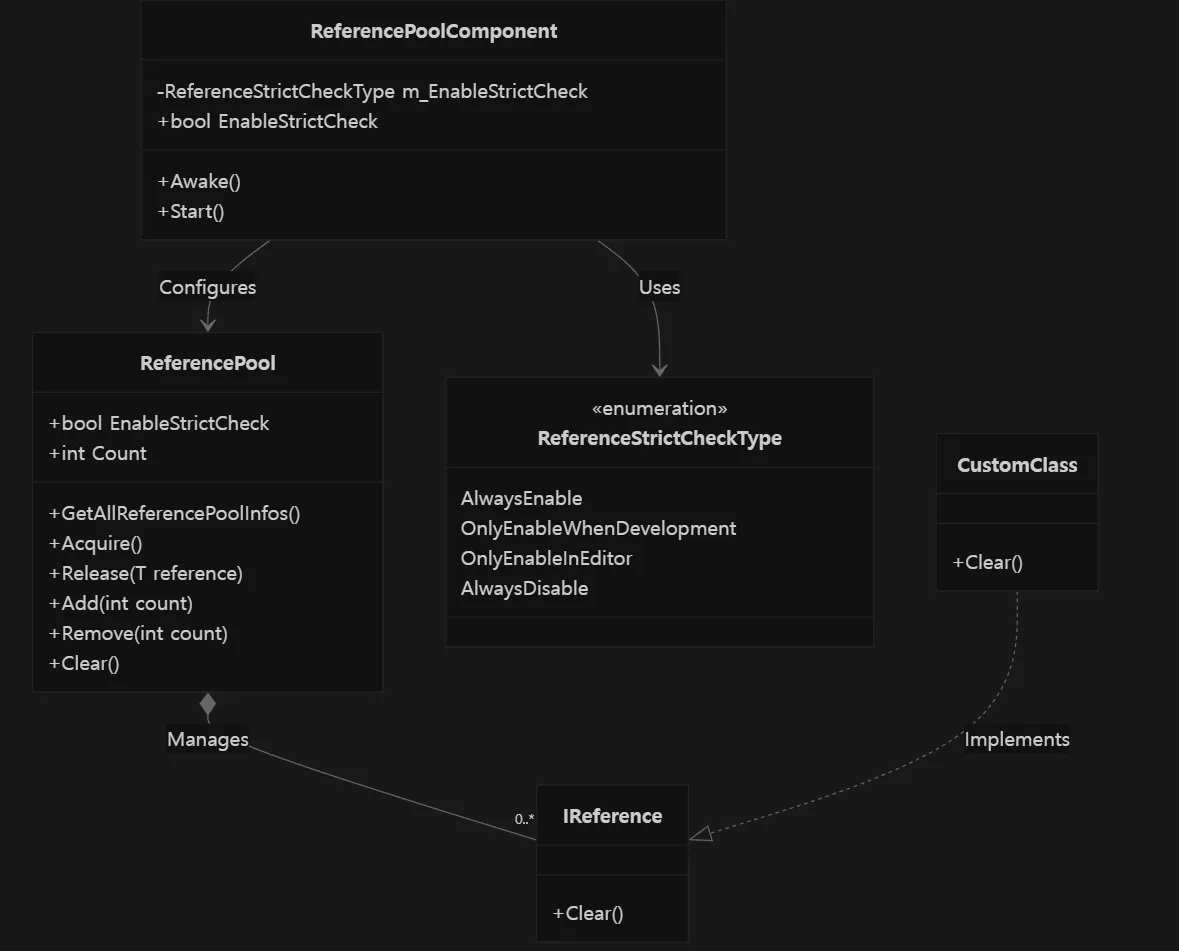
Reference Pooling 시스템은 다음과 같은 주요 구성요소로 이루어져 있습니다:
•
ReferencePool
정적 클래스. 타입별로 참조 객체 풀을 관리
•
ReferencePoolComponent
Unity 컴포넌트. 레퍼런스 풀 시스템을 초기화 및 설정
•
IReference Interface
풀링 대상 클래스가 반드시 구현해야 하는 인터페이스
(특히 Clear() 메서드 필수)
•
ReferenceStrictCheckType
Enum. 엄격 검사(Strict Check) 실행 조건 정의
Sources:
ReferencePoolComponent.cs
ReferenceStrictCheckType.cs
Object Lifecycle (객체 생명주기)
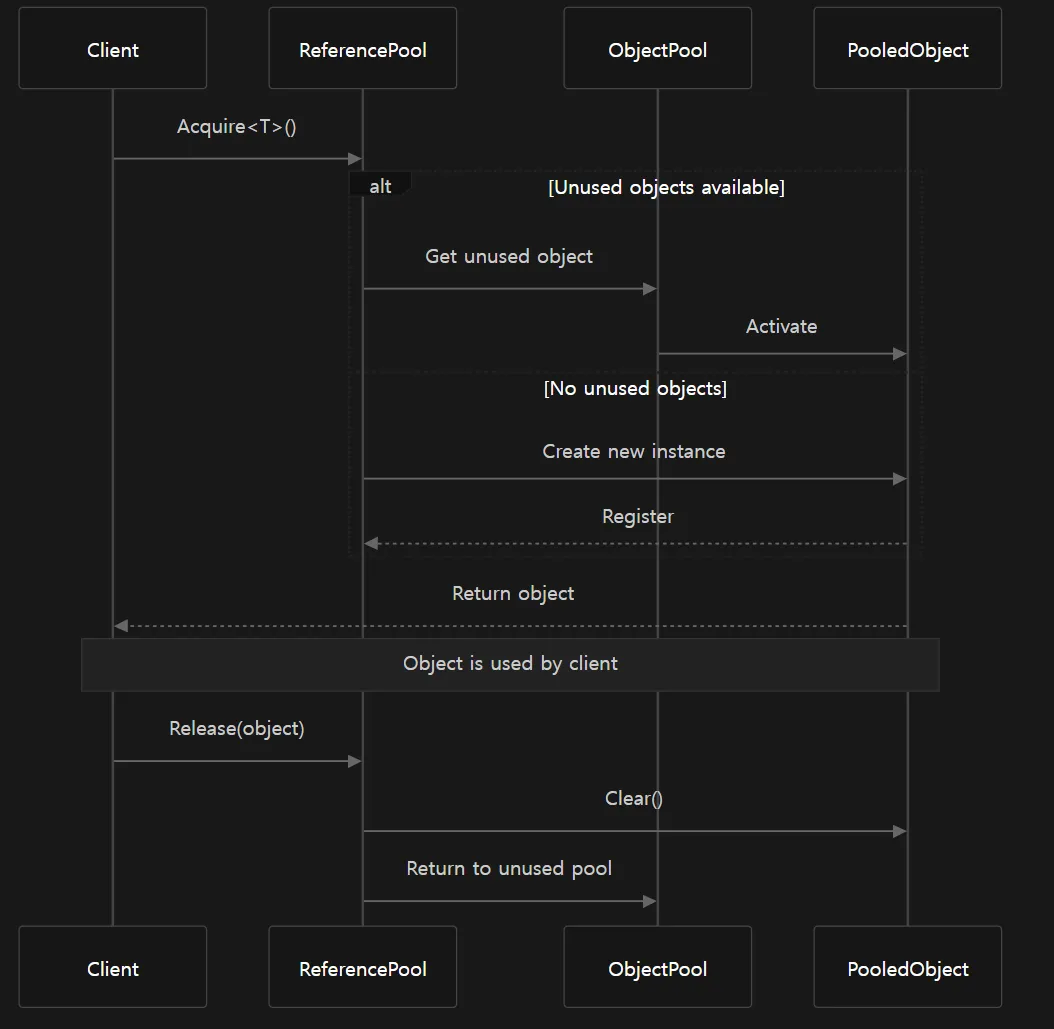
레퍼런스 풀 객체는 다음 단계를 거칩니다:
1.
클라이언트가 T 타입 객체 요청
•
풀에 미사용 객체가 있으면 반환
•
없으면 새 인스턴스 생성
2.
클라이언트 사용 완료 후 Release() 호출
3.
객체의 Clear() 메서드 실행 → 상태 초기화
4.
객체는 다시 풀에 보관, 재사용 가능
Sources:
ReferencePoolComponentInspector.cs
DebuggerComponent.ReferencePoolInformationWindow.cs
Setting Up Reference Pooling (레퍼런스 풀링 설정)
Configuration (설정)
ReferencePoolComponent를 통해 Strict Checking 동작을 설정할 수 있습니다.
•
AlwaysEnable: 항상 검사 수행
•
OnlyEnableWhenDevelopment: 개발 빌드에서만 수행
•
OnlyEnableInEditor: Unity 에디터에서만 수행
•
AlwaysDisable: 절대 검사하지 않음
Strict Checking은 잘못된 객체 사용을 잡아내지만 성능에 영향을 줌⇒ 개발 단계에서는 켜두고, 배포 단계에서는 꺼두는 게 일반적
Sources:
ReferenceStrictCheckType.cs
ReferencePoolComponent.cs
Creating Poolable Classes (풀링 가능한 클래스 생성)
풀링 가능한 클래스를 만들려면 반드시 IReference 인터페이스를 구현해야 합니다.
•
Clear() 메서드 구현
객체가 풀에 반환될 때 상태 초기화
•
외부 참조(예: static, 다른 객체 strong reference) 보관 금지
→ GC 방해 방지
그 후, ReferencePool을 통해 인스턴스 획득 및 반환 가능
Monitoring and Debugging (모니터링 및 디버깅)
Reference Pool Information Window
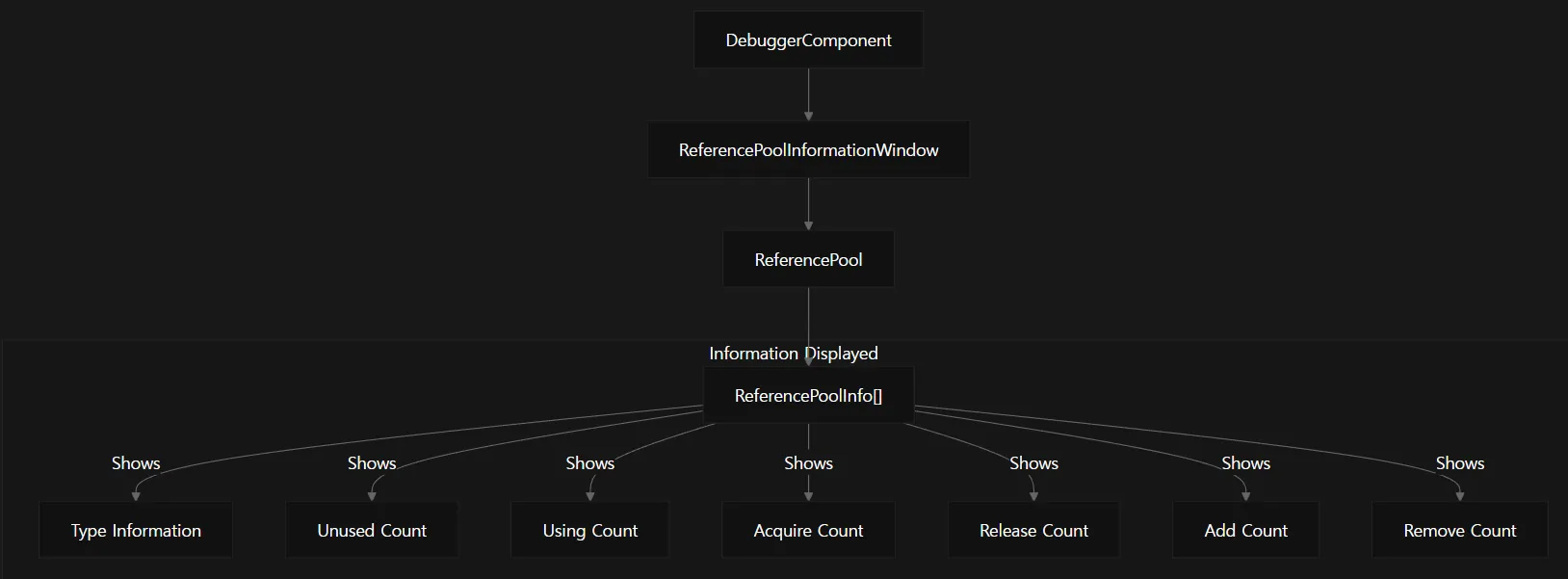
•
DebuggerComponent의 일부
•
레퍼런스 풀 상세 통계를 실시간 표시
표시 내용:
•
풀별 객체 개수
•
사용 중 / 재사용 가능 상태
•
획득/반환 통계
•
메모리 사용량
Sources:
DebuggerComponent.ReferencePoolInformationWindow.cs
Editor Inspector
Unity Editor에서 ReferencePoolComponentInspector를 통해 확인 가능
•
현재 EnableStrictCheck 상태 표시
•
Play 모드 시 전체 풀 통계 표시
•
CSV로 내보내기 지원
•
클래스 이름 전체 표시 옵션
Sources:
ReferencePoolComponentInspector.cs
Performance Considerations (성능 고려사항)
시나리오 | 풀링 없음 | 풀링 있음 |
메모리 사용 | 생성/삭제 반복 → 높음 | 재사용 → 낮음 |
GC 압박 | 잦은 할당 → 높음 | 적은 할당 → 낮음 |
CPU 부하 | GC 시 스파이크 발생 | 일정한 성능 유지 |
주의사항:•
Strict Checking은 개발용 (성능 저하 유발)
•
너무 큰 풀은 메모리 낭비
•
반드시 Release() 호출 필요 (안 하면 사실상 메모리 누수)
•
Clear()는 모든 상태를 초기화해야 함
Integration with Other Systems (다른 시스템과의 통합)

Framework의 여러 시스템에서 Reference Pooling을 내부적으로 사용합니다:
•
이벤트 시스템의 이벤트 인자
•
네트워크 메시지 객체
•
UI 시스템의 커맨드 객체
•
임시 데이터 컨테이너
즉, Framework 전반 성능 최적화의 핵심 인프라
Best Practices (모범 사례)
1.
IReference 올바르게 구현
•
Clear()에서 모든 상태 초기화
2.
풀 크기 균형
•
미리 너무 많이 할당하지 말고, 수요에 맞게 확장
3.
정기 모니터링
•
내장 디버깅 툴로 풀 상태 확인
4.
객체 수명 고려
•
짧게 자주 생성/삭제되는 객체에 특히 효과적
5.
두 풀링 시스템의 적절한 활용
•
Object Pooling → GameObject
•
Reference Pooling → Lightweight C# class
 정리하면,
•
Reference Pooling은 Unity GameObject가 아닌 순수 C# 객체 관리를 최적화하는 시스템
•
Object Pooling과 함께 사용하여 게임 성능과 메모리 최적화를 극대화