



Abstract

Scene 컴포넌트는 SceneManager.LoadSceneAsync 를 감싼 것입니다. 달라지는 점은 세 가지 — 결과가 이벤트로 오고, 로딩·언로딩 중인 씬 목록을 프레임워크가 추적하며, 모든 씬이 Additive 로 올라갑니다. 프레임워크가 사는 씬은 그대로 두고 그 위에 콘텐츠 씬을 얹었다 내렸다 하는 구조입니다.
실무에서 필요한 순간
•
로비 → 스테이지 → 결과 화면처럼 씬을 갈아 끼우는 게임
•
로딩 화면에 진행률을 표시해야 할 때 (LoadSceneUpdate 이벤트)
•
큰 맵을 여러 씬으로 쪼개 필요한 구역만 올릴 때
전형적인 사용 — Procedure 에서 씬 전환
public class ProcedureChangeScene : ProcedureBase
{
private bool mLoaded;
protected override void OnEnter(IFsm<IProcedureManager> procedureOwner)
{
base.OnEnter(procedureOwner);
mLoaded = false;
EventComponent events = GameEntry.GetComponent<EventComponent>();
events.Subscribe(LoadSceneSuccessEventArgs.EventId, OnLoadSceneSuccess);
SceneComponent scene = GameEntry.GetComponent<SceneComponent>();
scene.LoadScene("Assets/Scenes/Stage01.unity");
}
protected override void OnUpdate(IFsm<IProcedureManager> procedureOwner, float elapseSeconds, float realElapseSeconds)
{
base.OnUpdate(procedureOwner, elapseSeconds, realElapseSeconds);
if (!mLoaded)
return;
ChangeState<ProcedureMain>(procedureOwner);
}
protected override void OnLeave(IFsm<IProcedureManager> procedureOwner, bool isShutdown)
{
GameEntry.GetComponent<EventComponent>().Unsubscribe(LoadSceneSuccessEventArgs.EventId, OnLoadSceneSuccess);
base.OnLeave(procedureOwner, isShutdown);
}
private void OnLoadSceneSuccess(object sender, GameEventArgs e)
{
mLoaded = true;
}
}
C#
복사
ToyboxNightmare 에서는
쓰지 않습니다. 예제는 MainScene 하나에서 끝나고, 배경(Environment)도 씬이 아니라 Addressables 프리팹으로 불러옵니다. 재시작도 씬 리로드가 아니라 엔티티를 전부 Hide 하고 Procedure 를 다시 도는 방식입니다( 09. 게임오버와 재시작 — 풀 재사용 점검). 스테이지를 여러 개로 늘릴 때 처음 필요해지는 모듈입니다.
이 에디션에서 다른 점
•
씬은 Addressables 로 로드됩니다(Addressables.LoadSceneAsync(..., LoadSceneMode.Additive)). 씬 에셋을 Addressables 그룹에 등록해야 하고, Build Settings 의 씬 목록과는 무관합니다.
•
씬 이름 규칙은 원작 그대로입니다. "Assets/" 로 시작하고 ".unity" 로 끝나야 하며, 어기면 에러 로그만 남고 로드되지 않습니다. 따라서 씬의 Addressables 주소도 이 전체 경로로 맞춥니다(엔티티·UI 의 짧은 주소와 다른 점).
Scene Management (씬 관리)
Relevant source files (관련 소스 파일)
•
Scripts/Runtime/Entity/EntityComponent.cs
•
Scripts/Runtime/Scene/SceneComponent.cs
•
Scripts/Runtime/Sound/SoundComponent.cs
•
Scripts/Runtime/UI/UIComponent.cs
Purpose and Scope (목적 및 범위)
Unity Game Framework의 씬 관리 시스템(Scene Management system) 은 게임 내의 씬 로딩, 언로딩, 전환을 중앙에서 관리하는 기능을 제공합니다.
이 시스템은 비동기 씬 작업을 처리하면서, 리소스 관리 시스템과 통합되어 종속성 로딩 및 씬 에셋 검색을 지원합니다.
또한 씬 상태 관리, 씬 순서 지정 기능, 메인 카메라 참조 관리를 제공합니다.
•
UI 관리와 관련된 내용은 UI System 참고
•
엔티티 관리와 관련된 내용은 Entity System 참고
Architecture Overview (아키텍처 개요)
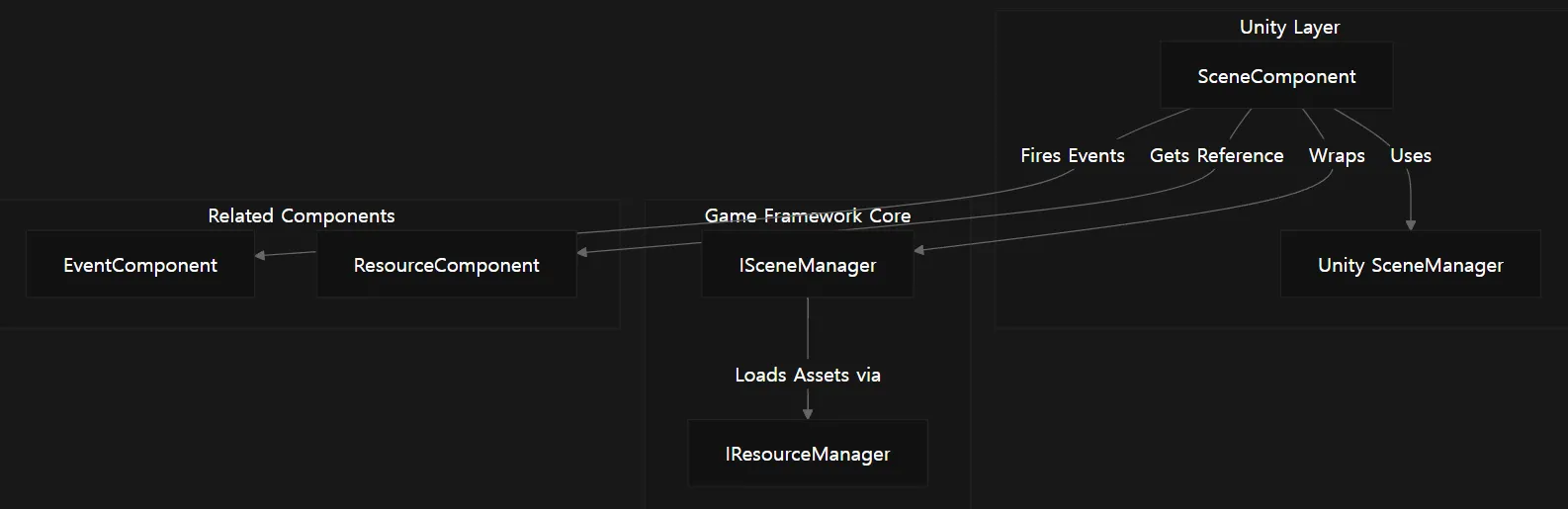
씬 관리 시스템은 Unity에서 사용하는 인터페이스인 SceneComponent로 구성되며, 이는 GameFramework 코어의 ISceneManager 모듈과 통신합니다.
Sources:
Scripts/Runtime/Scene/SceneComponent.cs 26-85
Initialization and Setup (초기화 및 설정)
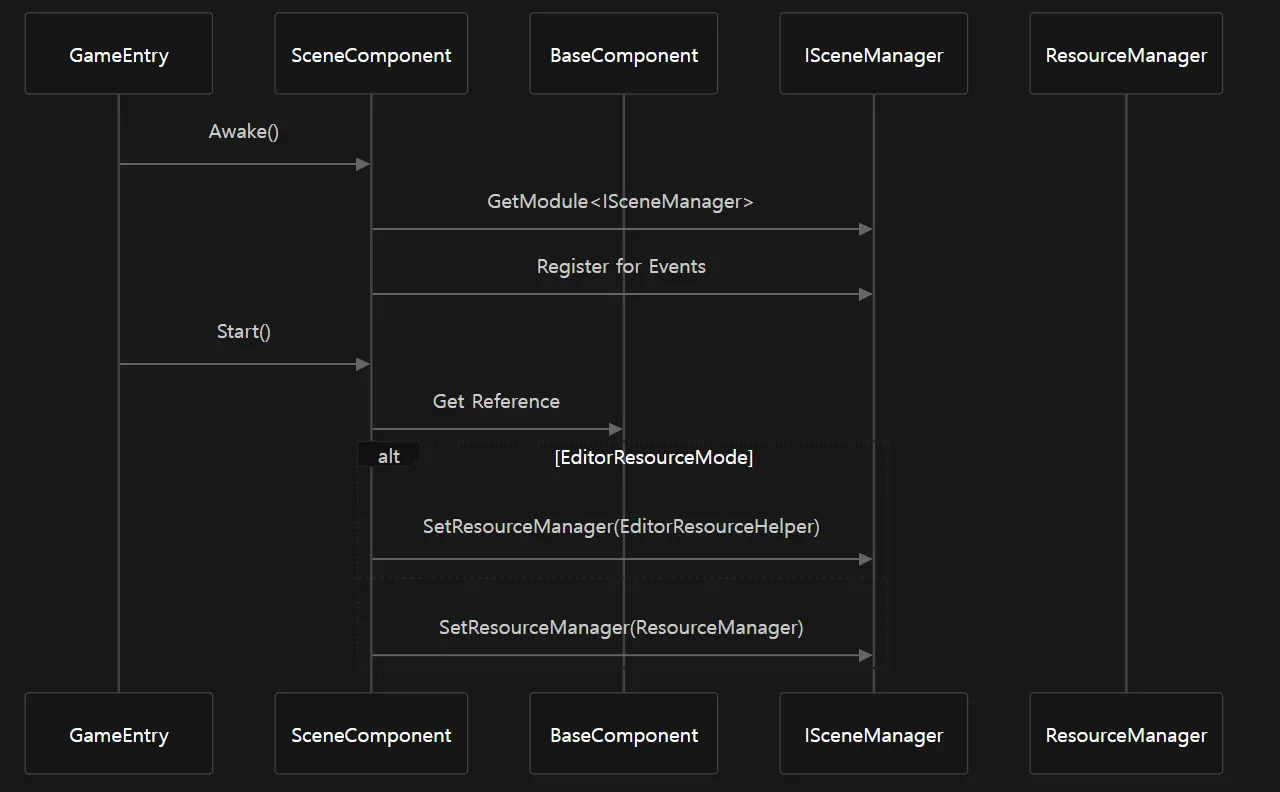
초기화 시, SceneComponent 는 Game Framework의 ISceneManager 참조를 획득하고, 이벤트를 등록하며, 리소스 매니저를 씬 로딩 작업에 맞게 설정합니다.
Sources:
Scripts/Runtime/Scene/SceneComponent.cs 53-111
Scene Operations (씬 작업)
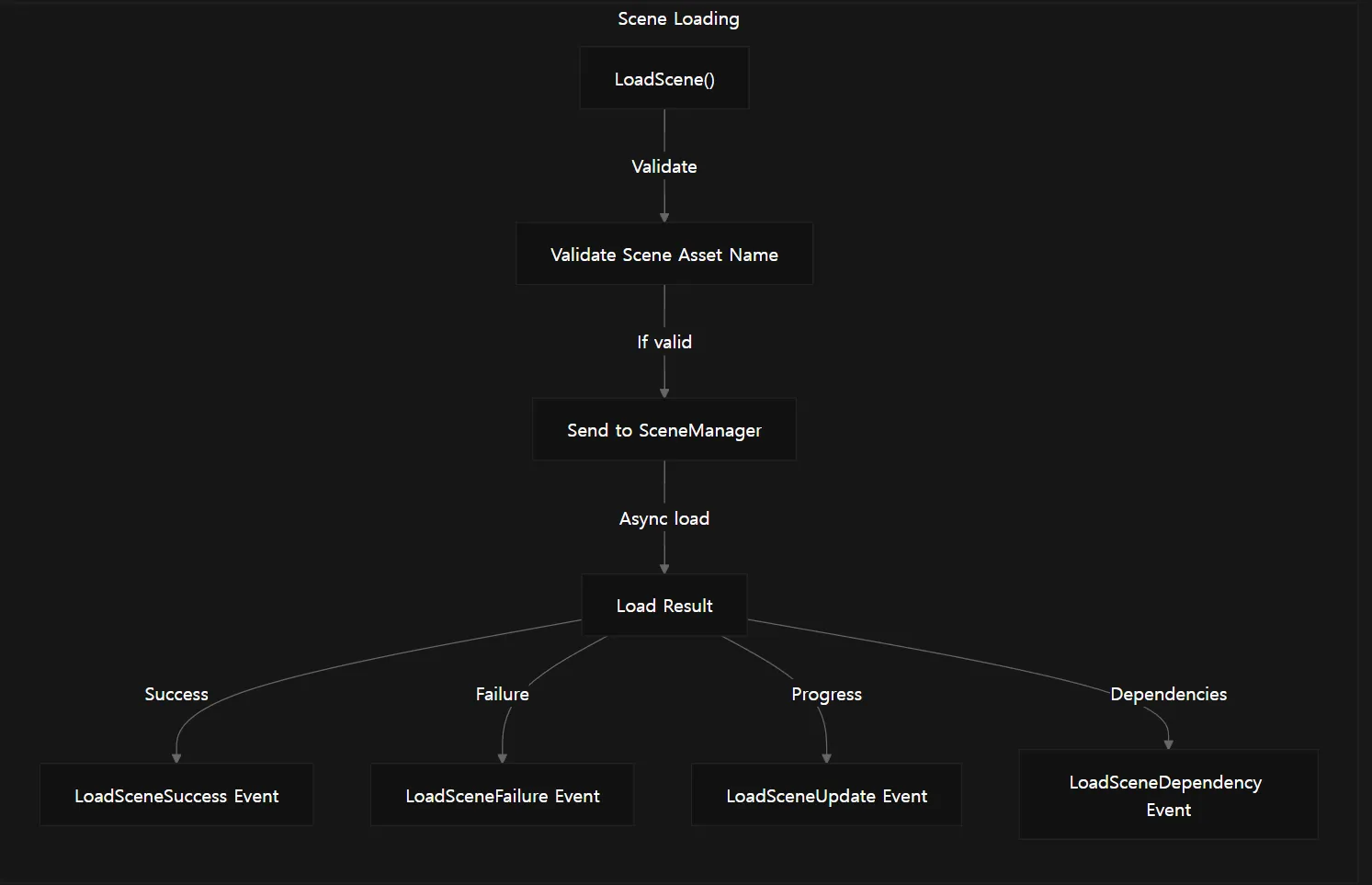
씬 관리 시스템은 씬을 로드, 언로드, 상태 확인할 수 있는 다양한 기능을 제공합니다.
Loading Scenes (씬 로딩)
Sources:
Scripts/Runtime/Scene/SceneComponent.cs 252-299
Scripts/Runtime/Scene/SceneComponent.cs 437-462
Scene Status Checking (씬 상태 확인)
다음 메서드를 통해 씬이 로드되었는지, 로딩 중인지, 언로딩 중인지 확인할 수 있습니다:
Method | Purpose (목적) |
SceneIsLoaded | 씬이 현재 로드되었는지 확인 |
GetLoadedSceneAssetNames | 로드된 모든 씬 이름 반환 |
SceneIsLoading | 씬이 로딩 중인지 확인 |
GetLoadingSceneAssetNames | 로딩 중인 모든 씬 이름 반환 |
SceneIsUnloading | 씬이 언로딩 중인지 확인 |
GetUnloadingSceneAssetNames | 언로딩 중인 모든 씬 이름 반환 |
HasScene | 씬 에셋이 존재하는지 확인 |
Sources:
Scripts/Runtime/Scene/SceneComponent.cs 147-247
Unloading Scenes (씬 언로딩)
Sources:
Scripts/Runtime/Scene/SceneComponent.cs 302-332
Scripts/Runtime/Scene/SceneComponent.cs 464-475
Scene Ordering (씬 순서 지정)
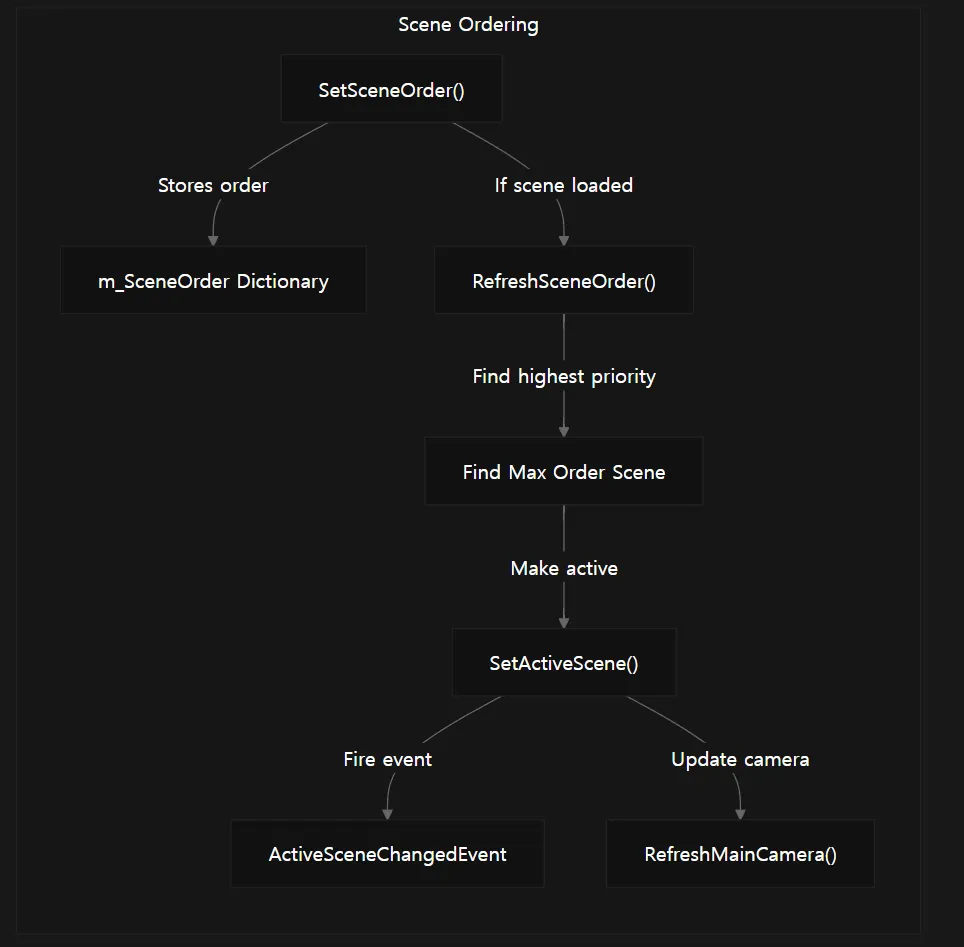
씬 관리 시스템은 씬의 순서 및 우선순위를 설정할 수 있으며, 이를 통해 어떤 씬이 활성 씬이 될지 결정합니다.
Sources:
Scripts/Runtime/Scene/SceneComponent.cs 336-435
Scene Events (씬 이벤트)
씬 관리 시스템은 씬 작업에 대한 다양한 이벤트를 제공합니다:
Event | Triggered When (트리거 시점) |
LoadSceneSuccess | 씬 로드 성공 |
LoadSceneFailure | 씬 로드 실패 |
LoadSceneUpdate | 씬 로딩 중 진행 상황 업데이트 |
LoadSceneDependencyAsset | 씬 종속성 로딩 시 |
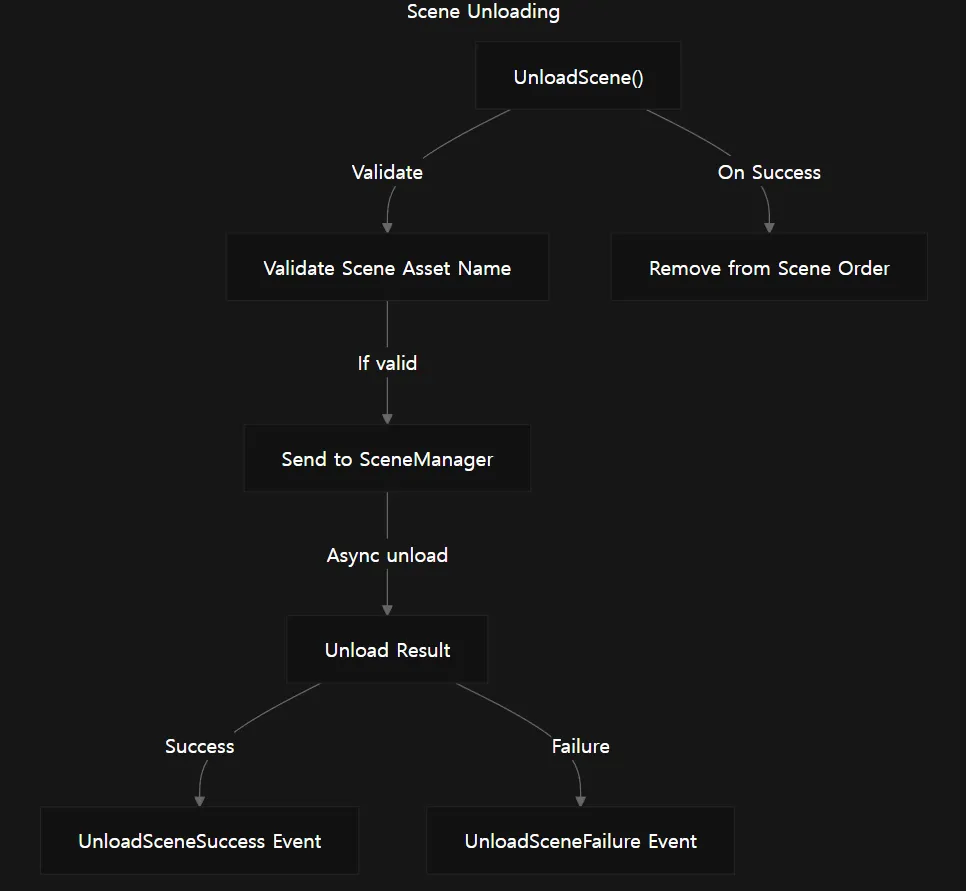
UnloadSceneSuccess | 씬 언로딩 성공 |
UnloadSceneFailure | 씬 언로딩 실패 |
ActiveSceneChanged | 활성 씬 변경 |
Sources:
Scripts/Runtime/Scene/SceneComponent.cs 53-85
Scripts/Runtime/Scene/SceneComponent.cs 437-475
Integration with Other Systems (다른 시스템과의 통합)
Main Camera Management (메인 카메라 관리)
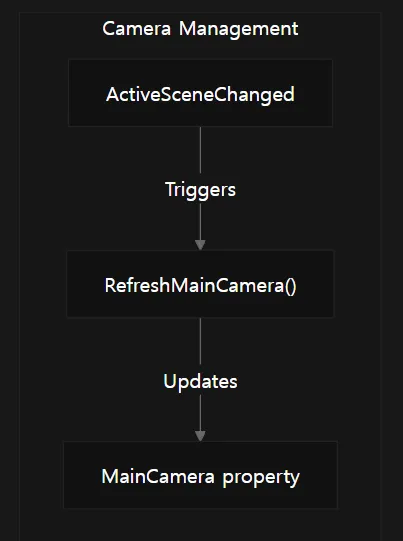
씬 관리 시스템은 메인 카메라 참조를 유지하며, 씬이 변경될 때 이 참조를 새로 고치는 기능을 제공합니다.
Sources:
Scripts/Runtime/Scene/SceneComponent.cs 372-375
Scripts/Runtime/Scene/SceneComponent.cs 425-435
Sound System Integration (사운드 시스템 통합)
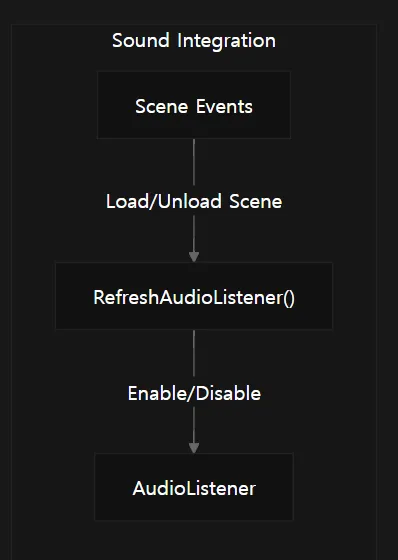
씬이 로드되거나 언로드될 때, 사운드 시스템은 오디오 리스너(Audio Listener) 를 새로 갱신해야 올바르게 작동합니다.
Sources:
Scripts/Runtime/Sound/SoundComponent.cs 657-689
Entity System Integration (엔티티 시스템 통합)
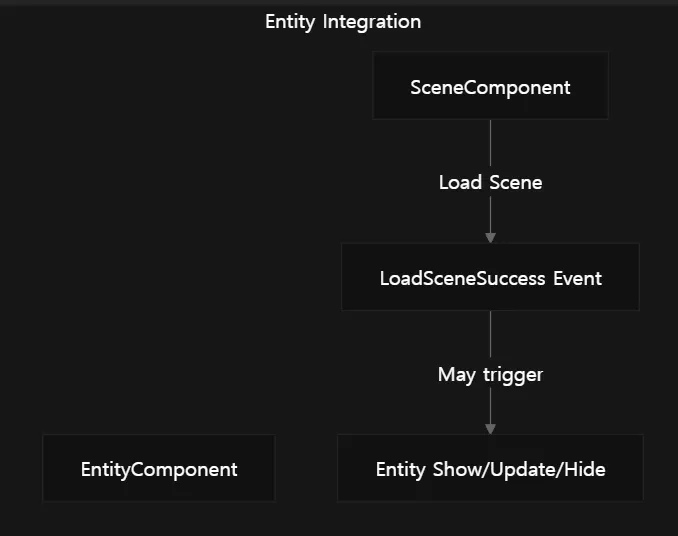
게임 내 엔티티들은 씬 변경을 인식할 필요가 있습니다. 특히, 여러 씬에 걸쳐 존재하거나 씬 전용 엔티티를 관리해야 할 때 필요합니다.
Sources:
Scripts/Runtime/Entity/EntityComponent.cs 1-145
Example Usage (사용 예제)
Load a scene (씬 로드)
// Get the Scene Component
SceneComponent sceneComponent = GameEntry.GetComponent<SceneComponent>();
// Load a scene with default priority
sceneComponent.LoadScene("Assets/Scenes/GameLevel.unity");
// Load a scene with custom priority and user data
sceneComponent.LoadScene("Assets/Scenes/GameLevel.unity", 100, userData);
C#
복사
Unload a scene (씬 언로딩)
// Unload a scene
sceneComponent.UnloadScene("Assets/Scenes/GameLevel.unity");
// Unload a scene with user data
sceneComponent.UnloadScene("Assets/Scenes/GameLevel.unity", userData);
C#
복사
Check scene status (씬 상태 확인)
// Check if a scene is loaded
bool isLoaded = sceneComponent.SceneIsLoaded("Assets/Scenes/GameLevel.unity");
// Check if a scene is loading
bool isLoading = sceneComponent.SceneIsLoading("Assets/Scenes/GameLevel.unity");
C#
복사
Set scene order (씬 순서 지정)
// Set a scene's order (higher order means higher priority)
sceneComponent.SetSceneOrder("Assets/Scenes/GameLevel.unity", 10);
C#
복사
Sources:
Scripts/Runtime/Scene/SceneComponent.cs 252-368
Best Practices (모범 사례)
•
씬 이름 관리: 씬 에셋 이름은 반드시 "Assets/" 로 시작해 ".unity" 로 끝나는 전체 경로를 사용하세요.
•
씬 순서: 멀티 씬 환경에서 어떤 씬이 활성 씬인지 제어하기 위해 씬 순서를 활용하세요.
•
이벤트 처리: 씬 이벤트에 구독하여 다른 시스템에서 씬 로딩/언로딩 작업에 대응하세요.
•
리소스 관리: 씬 로딩은 리소스 관리 시스템과 통합되어 있으므로, 리소스 로딩 설정이 씬 로딩에 영향을 줍니다.
•
메인 카메라: 씬 변경 후, 게임 로직이 카메라에 의존한다면 메인 카메라 참조를 새로 고쳐야 할 수 있습니다.
Sources:
Scripts/Runtime/Scene/SceneComponent.cs 1-477