



Antialiasing
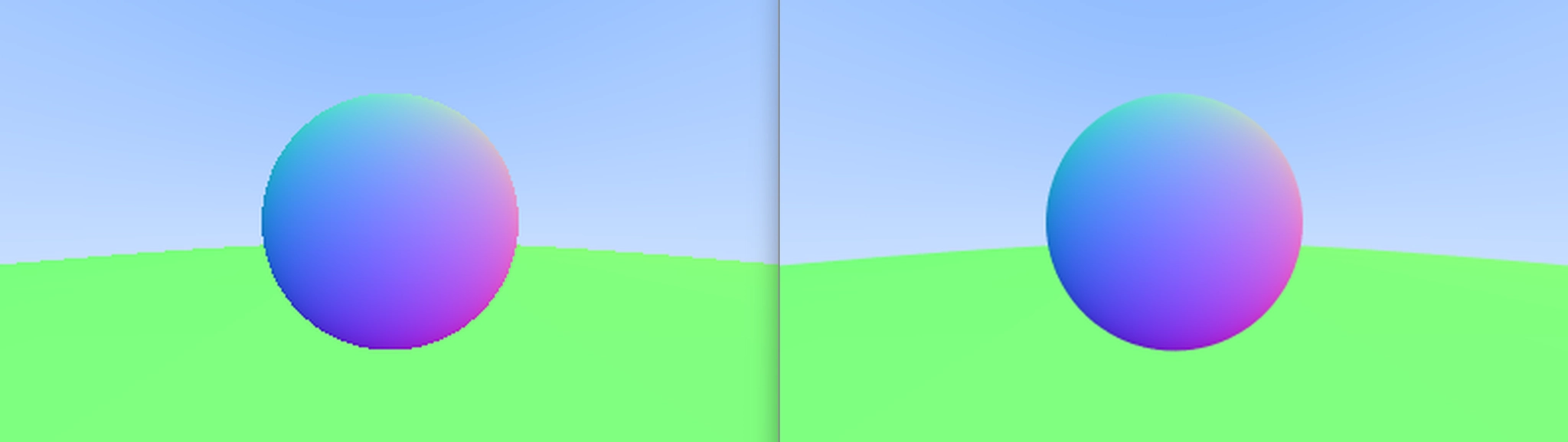
지금까지 렌더링된 이미지를 확대해보면, 이미지의 가장자리에서 거친 "계단 형태"를 발견할 수 있을 것입니다. 이러한 계단 형태는 일반적으로 "앨리어싱(aliasing)" 또는 "재기(jaggies)"라고 불립니다. 실제 카메라가 사진을 찍을 때는 보통 가장자리에 재기가 없는데, 이는 가장자리 픽셀이 일부 전경과 일부 배경의 혼합이기 때문입니다. 우리의 렌더링된 이미지와 달리, 실제 세계의 진정한 이미지는 연속적이라는 점을 고려해보세요. 다르게 말하면, 세계(그리고 그것의 모든 진정한 이미지)는 사실상 무한한 해상도를 가지고 있습니다. 우리는 각 픽셀에 대해 여러 샘플을 평균화함으로써 동일한 효과를 얻을 수 있습니다.
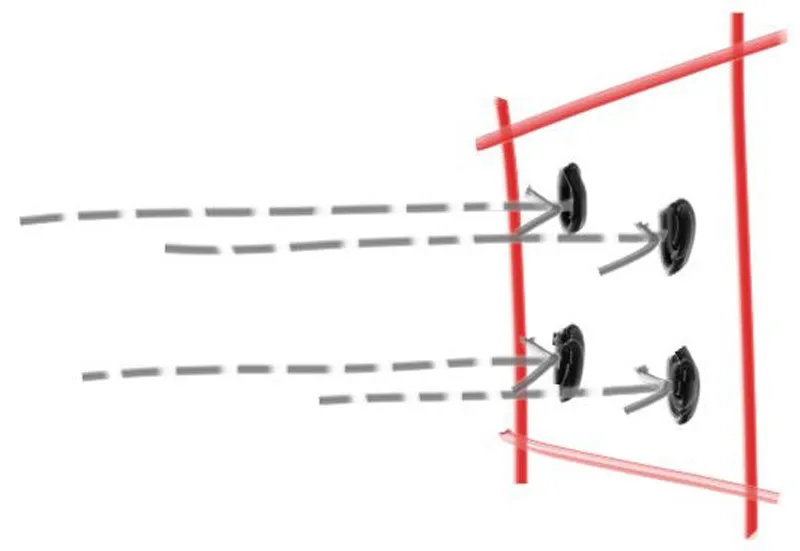
각 픽셀의 중심을 통과하는 단일 광선으로, 우리는 일반적으로 점 샘플링(point sampling)이라고 불리는 것을 수행하고 있습니다. 점 샘플링의 문제는 멀리 떨어진 작은 체커보드를 렌더링함으로써 설명할 수 있습니다. 이 체커보드가 검은색과 흰색 타일의 8×8 격자로 구성되어 있지만 네 개의 광선만 닿는다면, 네 개의 광선 모두 흰색 타일만 교차하거나, 검은색만 교차하거나, 또는 어떤 이상한 조합을 이룰 수 있습니다. 실제 세계에서 우리가 눈으로 멀리 떨어진 체커보드를 인식할 때, 우리는 그것을 검은색과 흰색의 날카로운 점들 대신 회색으로 인식합니다. 이는 우리의 눈이 자연스럽게 우리가 레이 트레이서가 하기를 원하는 것을 하고 있기 때문입니다: 렌더링된 이미지의 특정한 (이산적인) 영역에 떨어지는 빛의 (연속 함수를) 적분하는 것입니다.
분명히 우리는 픽셀 중심을 통과하는 동일한 광선을 여러 번 재샘플링한다고 해서 아무것도 얻지 못합니다 — 매번 동일한 결과만 얻을 것입니다. 대신, 우리는 픽셀 주변에 떨어지는 빛을 샘플링한 다음, 그 샘플들을 적분하여 진정한 연속적인 결과를 근사화하고자 합니다. 그렇다면, 픽셀 주변에 떨어지는 빛을 어떻게 적분할까요?
우리는 가장 단순한 모델을 채택할 것입니다: 픽셀을 중심으로 하고 네 개의 인접 픽셀 각각까지 절반씩 확장되는 정사각형 영역을 샘플링하는 것입니다. 이것이 최적의 접근 방식은 아니지만, 가장 직관적입니다. (이 주제에 대한 더 깊은 탐구를 위해서는 A Pixel is Not a Little Square를 참조하세요.)
*Figure 8: Pixel samples*
Some Random Number Utilities
실수형 난수를 반환하는 난수 생성기가 필요합니다. 이 함수는 관례적으로 0≤n<1 범위에 속하는 정규 난수를 반환해야 합니다. 1 앞의 "미만(less than)"이 중요한데, 때때로 이를 활용할 것이기 때문입니다.
이를 위한 간단한 접근 방식은 cstdlib 에서 찾을 수 있는 std::rand() 함수를 사용하는 것입니다. 이 함수는 0과 RAND_MAX 사이의 정수형 난수를 반환합니다. 따라서 다음 코드 조각을 rtweek에 추가하여 원하는 실수형 난수를 얻을 수 있습니다.
#include <cmath>
#include <cstdlib>
#include <iostream>
#include <limits>
#include <memory>
...
// Utility Functions
inline double DegreesToRadians(double degrees)
{
return degrees * Pi / 180.0;
}
inline double RandomDouble()
{
// Returns a random real in [0, 1)
return std::rand() / (RAND_MAX + 1.0);
}
inline double RandomDouble(double minimum, double maximum)
{
// Returns a random real in [minimum, maximum)
return minimum + (maximum - minimum) * RandomDouble();
}
C++
복사
*리스팅 41: [rtweekend.h] random_double() 함수들*
C++는 전통적으로 표준 난수 생성기를 가지고 있지 않았지만, 최신 버전의 C++는 <random> 헤더로 이 문제를 해결했습니다(일부 전문가들에 따르면 불완전하게). 이것을 사용하고 싶다면, 다음과 같이 우리가 필요로 하는 조건을 가진 난수를 얻을 수 있습니다
...
#include <random>
...
inline double RandomDouble()
{
static std::uniform_real_distribution<double> distribution(0.0, 1.0);
static std::mt19937 generator;
return distribution(generator);
}
inline double RandomDouble(double minimum, double maximum)
{
// Returns a random real in [minimum, maximum)
return minimum + (maximum - minimum) * RandomDouble();
}
...
C++
복사
*리스팅 42: [rtweekend.h] random_double(), 대체 구현*
Generating Pixels with Multiple Samples
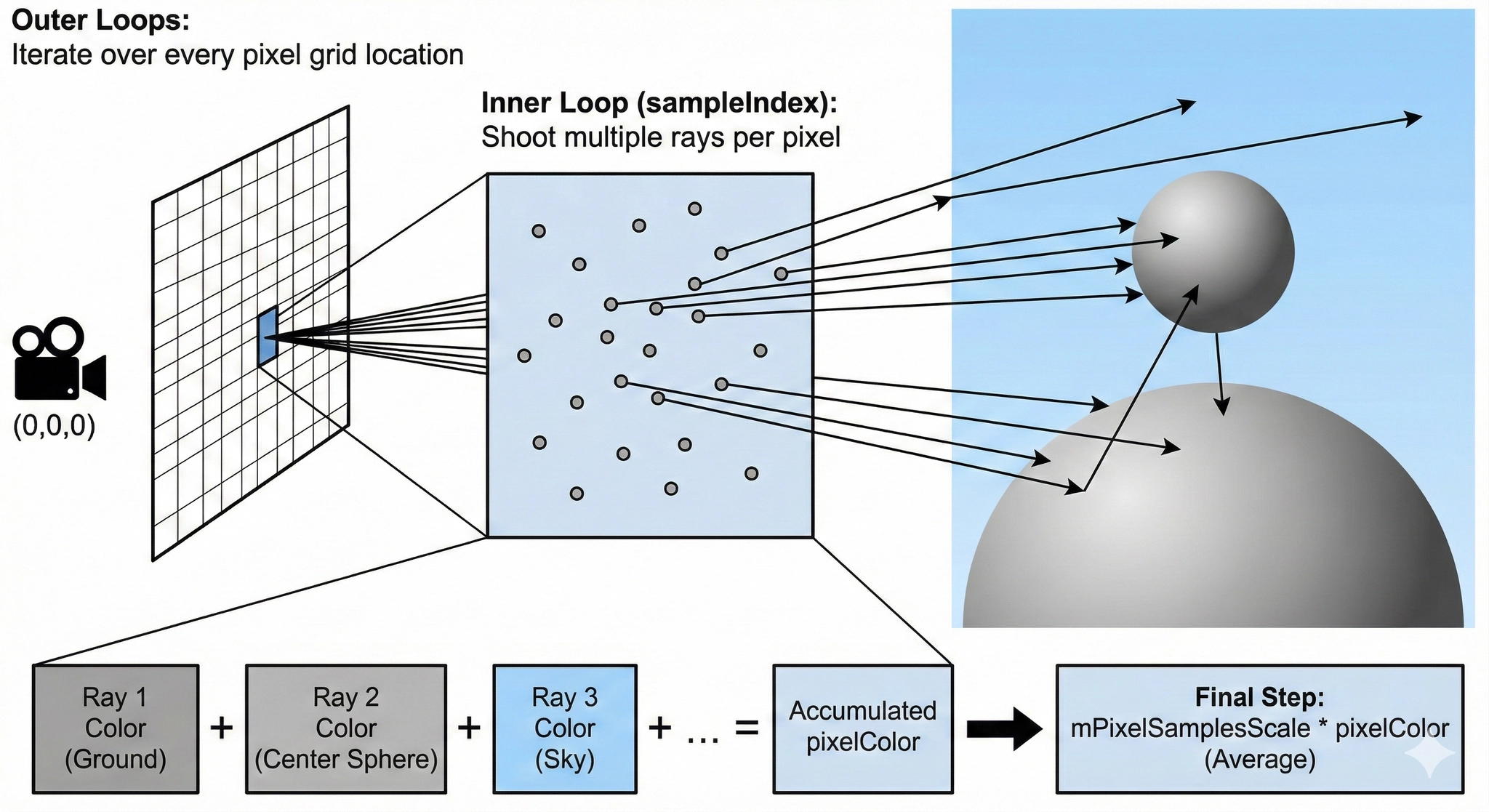
여러 샘플로 구성된 단일 픽셀의 경우, 픽셀을 둘러싼 영역에서 샘플을 선택하고 결과 빛(색상) 값들의 평균을 구할 것입니다.
먼저 사용하는 샘플의 수를 고려하도록 write_color() 함수를 업데이트할 것입니다: 우리가 취하는 모든 샘플들에 걸쳐 평균을 구해야 합니다. 이를 위해 각 반복에서 전체 색상을 더한 다음, 색상을 출력하기 전에 마지막에 (샘플 수로) 한 번의 나눗셈으로 마무리할 것입니다. 최종 결과의 색상 구성 요소가 적절한 [0,1] 범위 내에 유지되도록 하기 위해, 작은 헬퍼 함수인 interval::clamp(x)를 추가하고 사용할 것입니다.
class Interval
{
public:
...
bool Surrounds(double value) const
{
return mMinimum < value && value < mMaximum;
}
double Clamp(double value) const
{
if (value < Min)
{
return Min;
}
if (value > Max)
{
return Max;
}
return value;
}
...
private:
double mMinimum = 0.0;
double mMaximum = 0.0;
};
C++
복사
*리스팅 43: [interval.h] interval::clamp() 유틸리티 함수*
다음은 구간 클램핑 함수를 통합한 업데이트된 write_color() 함수입니다:
#include "Interval.h"
#include "Vec3.h"
using Color = Vec3;
void WriteColor(std::ostream& out, const Color& pixelColor)
{
auto red = pixelColor.X();
auto green = pixelColor.Y();
auto blue = pixelColor.Z();
// Translate the [0, 1] component values to the byte range [0, 255]
static const Interval intensity(0.000, 0.999);
int redByte = static_cast<int>(256.0 * intensity.Clamp(red));
int greenByte = static_cast<int>(256.0 * intensity.Clamp(green));
int blueByte = static_cast<int>(256.0 * intensity.Clamp(blue));
// Write out the pixel color components
out << redByte << ' ' << greenByte << ' ' << blueByte << '\n';
}
C++
복사
*리스팅 44: [color.h] 다중 샘플 write_color() 함수*
이제 카메라 클래스를 업데이트하여 각 픽셀에 대해 다른 샘플을 생성할 새로운 camera::get_ray(i,j) 함수를 정의하고 사용해 봅시다. 이 함수는 원점을 중심으로 한 단위 정사각형 내에서 무작위 샘플 포인트를 생성하는 새로운 헬퍼 함수 sample_square()를 사용할 것입니다. 그런 다음 이 이상적인 정사각형에서의 무작위 샘플을 현재 샘플링하고 있는 특정 픽셀로 다시 변환합니다.
class Camera
{
public:
void Render(const Hittable& world)
{
Initialize();
std::cout << "P3\n" << imageWidth << ' ' << mImageHeight << "\n255\n";
for (int scanlineIndex = 0; scanlineIndex < mImageHeight; scanlineIndex++)
{
std::clog
<< "\rScanlines remaining: "
<< (mImageHeight - scanlineIndex)
<< ' '
<< std::flush;
for (int pixelIndex = 0; pixelIndex < imageWidth; pixelIndex++)
{
Color pixelColor(0.0, 0.0, 0.0);
for (int sampleIndex = 0; sampleIndex < samplesPerPixel; sampleIndex++)
{
Ray ray = GetRay(pixelIndex, scanlineIndex);
pixelColor += RayColor(ray, world);
}
WriteColor(std::cout, mPixelSamplesScale * pixelColor);
}
}
std::clog << "\rDone. \n";
}
private:
void Initialize()
{
mImageHeight = static_cast<int>(imageWidth / aspectRatio);
mImageHeight = (mImageHeight < 1) ? 1 : mImageHeight;
mPixelSamplesScale = 1.0 / static_cast<double>(samplesPerPixel);
mCenter = Point(0.0, 0.0, 0.0);
...
}
Ray GetRay(int pixelIndex, int scanlineIndex) const
{
// Construct a camera ray originating from the origin and directed at randomly sampled
// point around the pixel location pixelIndex, scanlineIndex.
auto offset = SampleSquare();
auto pixelSample =
mPixel00Location
+ ((pixelIndex + offset.X()) * mPixelDeltaU)
+ ((scanlineIndex + offset.Y()) * mPixelDeltaV);
auto rayOrigin = mCenter;
auto rayDirection = pixelSample - rayOrigin;
return Ray(rayOrigin, rayDirection);
}
Vec3 SampleSquare() const
{
// Returns the vector to a random point in the [-.5, -.5] - [+.5, +.5] unit square
return Vec3(RandomDouble() - 0.5, RandomDouble() - 0.5, 0.0);
}
Color RayColor(const Ray& ray, const Hittable& world) const
{
...
}
private:
int samplesPerPixel = 10; // Count of random samples for each pixel
int mImageHeight = 0; // Rendered image height
double mPixelSamplesScale = 1.0; // Color scale factor for a sum of pixel samples
Point mCenter; // Camera center
Point mPixel00Location; // Location of pixel 0, 0
Vec3 mPixelDeltaU; // Offset to pixel to the right
Vec3 mPixelDeltaV; // Offset to pixel below
};
C++
복사
*리스팅 45: [camera.h] 픽셀당 샘플 수 파라미터를 가진 카메라*
(위의 새로운 sample_square() 함수 외에도, Github 소스 코드에서 sample_disk() 함수를 찾을 수 있습니다. 이것은 정사각형이 아닌 픽셀을 실험하고 싶은 경우를 위해 포함되었지만, 이 책에서는 사용하지 않을 것입니다. sample_disk()는 나중에 정의되는 random_in_unit_disk() 함수에 의존합니다.)
Main은 새로운 카메라 파라미터를 설정하도록 업데이트됩니다.
int main()
{
...
Camera camera;
camera.aspectRatio = 16.0 / 9.0;
camera.imageWidth = 400;
camera.samplesPerPixel = 100;
camera.Render(world);
}
C++
복사
생성된 이미지를 확대하면 엣지 픽셀의 차이를 볼 수 있습니다.
*이미지 6: 안티앨리어싱 전후*