



Metal
An Abstract Class for Materials
서로 다른 객체들이 서로 다른 재질을 가지도록 하려면, 설계 결정을 내려야 합니다. 많은 매개변수를 가진 범용 재질 타입을 만들어서 각 재질 타입이 자신에게 영향을 주지 않는 매개변수를 무시하도록 할 수 있습니다. 이것도 나쁜 접근 방식은 아닙니다. 또는 고유한 동작을 캡슐화하는 추상 재질 클래스를 만들 수도 있습니다. 저는 후자의 접근 방식을 선호합니다. 우리 프로그램에서 재질은 두 가지 작업을 수행해야 합니다:
1.
산란된 광선을 생성합니다 (또는 입사 광선이 흡수되었다고 말합니다).
2.
산란되었다면, 광선이 얼마나 감쇠되어야 하는지 말합니다.
이는 다음과 같은 추상 클래스를 제안합니다:
// Material.h
#pragma once
#include "Hittable.h"
class Material
{
public:
virtual ~Material() = default;
virtual bool Scatter(const Ray& rayIn, const HitRecord& hitRecord, Color& attenuation, Ray& scattered) const
{
return false;
}
};
C++
복사
*리스팅 58: [material.h] material 클래스*
A Data Structure to Describe Ray-Object Intersections (광선-객체 교차를 설명하는 데이터 구조)
hit_record는 많은 인수들을 피하기 위한 것으로, 우리가 원하는 정보를 그 안에 넣을 수 있습니다. 캡슐화된 타입 대신 인수를 사용할 수도 있으며, 이는 그저 취향의 문제입니다. Hittable과 material은 코드에서 서로의 타입을 참조할 수 있어야 하므로 참조의 순환성이 있습니다. C++에서는 class material; 줄을 추가하여 컴파일러에게 material이 나중에 정의될 클래스라고 알려줍니다. 클래스에 대한 포인터만 지정하고 있으므로, 컴파일러는 클래스의 세부 사항을 알 필요가 없어서 순환 참조 문제가 해결됩니다.
class Material;
class HitRecord
{
public:
Point3 point;
Vec3 normal;
std::shared_ptr<Material> material;
double t = 0.0;
bool isFrontFace = false;
void SetFaceNormal(const Ray& ray, const Vec3& outwardNormal)
{
isFrontFace = Dot(ray.Direction(), outwardNormal) < 0.0;
normal = isFrontFace ? outwardNormal : -outwardNormal;
}
};
C++
복사
*리스팅 59: [hittable.h] 재질 포인터가 추가된 hit record*
hit_record는 여러 인수들을 클래스에 담아서 그룹으로 보낼 수 있도록 하는 방법일 뿐입니다. 광선이 표면(예를 들어 특정 구)에 부딪히면, hit_record의 재질 포인터는 구가 main()에서 설정될 때 주어진 재질 포인터를 가리키도록 설정됩니다. ray_color() 루틴이 hit_record를 받으면, 재질 포인터의 멤버 함수를 호출하여 어떤 광선이 산란되는지, 있다면 찾아낼 수 있습니다.
이를 달성하기 위해서는 구에 할당된 재질을 알아야 합니다.
// Sphere.h
#pragma once
#include "Hittable.h"
#include <memory>
class Sphere : public Hittable
{
public:
Sphere(const Point& center, double radius, const std::shared_ptr<Material>& material)
: mCenter(center)
, mRadius(std::fmax(0.0, radius))
, mMaterial(material)
{
}
bool Hit(const Ray& ray, const Interval& rayT, HitRecord& hitRecord) const override
{
...
hitRecord.t = root;
hitRecord.point = ray.At(hitRecord.t);
Vec3 outwardNormal = (hitRecord.point - mCenter) / mRadius;
hitRecord.SetFaceNormal(ray, outwardNormal);
hitRecord.Material= mMaterial;
return true;
}
private:
Point mCenter;
double mRadius = 0.0;
std::shared_ptr<Material> mMaterial;
};
C++
복사
*리스팅 60: [sphere.h] 재질 정보가 추가된 광선-구 교차*
Modeling Light Scatter and Reflectance (빛의 산란과 반사율 모델링)
이 책들 전반에 걸쳐 우리는 albedo(라틴어로 "백색도")라는 용어를 사용할 것입니다. Albedo는 일부 분야에서 정확한 기술 용어이지만, 모든 경우에 어떤 형태의 분수 반사율을 정의하는 데 사용됩니다. Albedo는 재질 색상에 따라 달라지며 (나중에 유리 재질에 대해 구현할 것처럼) 입사 시야 방향(입사 광선의 방향)에 따라서도 달라질 수 있습니다.
람베르시안(확산) 반사율은 항상 산란하고 반사율 R에 따라 빛을 감쇠시키거나, (산란되지 않은 광선이 재질에 흡수되는 경우) 감쇠 없이 일정 확률(1−R)로 산란할 수 있습니다. 또한 이 두 전략의 혼합일 수도 있습니다. 우리는 항상 산란하도록 선택할 것이므로, 람베르시안 재질 구현은 간단한 작업이 됩니다:
class Material
{
...
};
class Lambertian : public Material
{
public:
explicit Lambertian(const Color& albedo)
: mAlbedo(albedo)
{
}
bool Scatter(const Ray& rayIn, const HitRecord& hitRecord, Color& attenuation,
Ray& scattered) const override
{
Vec3 scatterDirection = hitRecord.normal + RandomUnitVector();
scattered = Ray(hitRecord.point, scatterDirection);
attenuation = mAlbedo;
return true;
}
private:
Color mAlbedo;
};
C++
복사
*리스팅 61: [material.h] 새로운 lambertian 재질 클래스*
세 번째 옵션도 있습니다: 고정된 확률 p로 산란하고 감쇠를 albedo/p로 설정하는 것입니다. 이는 여러분의 선택입니다.
위 코드를 주의 깊게 살펴보면, 드물게 문제가 발생할 수 있는 경우를 발견할 것입니다. 생성된 임의의 단위 벡터가 법선 벡터와 정확히 반대 방향이라면, 두 벡터의 합이 0이 되어 산란 방향 벡터도 0이 됩니다. 이는 나중에 무한대와 NaN 같은 문제를 일으키므로, 전달하기 전에 이 조건을 확인해야 합니다.
이를 위해 vec3::near_zero()라는 새로운 벡터 메서드를 만들 것입니다. 이 메서드는 벡터가 모든 차원에서 0에 매우 가까우면 true를 반환합니다.
이 메서드는 입력의 절댓값을 반환하는 C++ 표준 라이브러리 함수인 std::fabs를 사용합니다.
// Vec3.h (추가)
class Vec3
{
public:
...
double LengthSquared() const
{
return mElements[0] * mElements[0]
+ mElements[1] * mElements[1]
+ mElements[2] * mElements[2];
}
bool NearZero() const
{
// Return true if the vector is close to zero in all dimensions
auto threshold = 1e-8;
return (std::fabs(mElements[0]) < threshold)
&& (std::fabs(mElements[1]) < threshold)
&& (std::fabs(mElements[2]) < threshold);
}
private:
double mElements[3] = {};
};
C++
복사
*리스팅 62: [vec3.h] vec3::near_zero() 메서드*
// Lambertian.h
#pragma once
#include "Material.h"
class Lambertian : public Material
{
public:
explicit Lambertian(const Color& albedo)
: mAlbedo(albedo)
{
}
bool Scatter(const Ray& rayIn, const HitRecord& hitRecord, Color& attenuation, Ray& scattered) const override
{
auto scatterDirection = hitRecord.normal + RandomUnitVector();
// Catch degenerate scatter direction
if (scatterDirection.NearZero())
{
scatterDirection = hitRecord.normal;
}
scattered = Ray(hitRecord.point, scatterDirection);
attenuation = mAlbedo;
return true;
}
private:
Color mAlbedo;
};
C++
복사
*리스팅 63: [material.h] 람베르시안 산란, 견고한 버전*
Mirrored Light Reflection
광택 있는 금속의 경우 광선은 무작위로 산란되지 않습니다. 핵심 질문은 다음과 같습니다: 금속 거울에서 광선은 어떻게 반사될까요? 벡터 수학이 우리의 친구입니다:
*그림 15: 광선 반사*
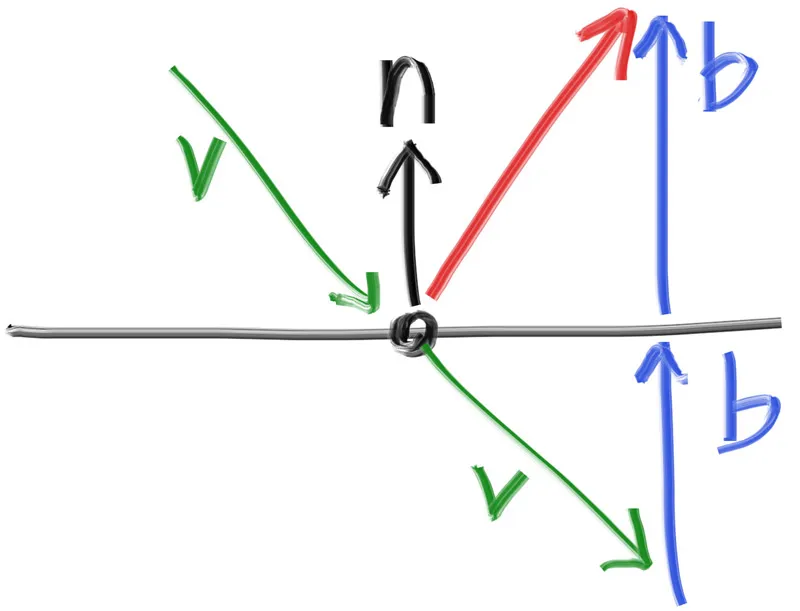
빨간색으로 표시된 반사 광선의 방향은 단순히 v+2b입니다. 우리의 설계에서 n은 단위 벡터(길이 1)이지만, v는 그렇지 않을 수 있습니다. 벡터 b를 구하려면, 법선 벡터에 v의 n 방향 투영 길이를 곱합니다. 이는 내적 v⋅n으로 주어집니다. (만약 n이 단위 벡터가 아니라면, 이 내적을 n의 길이로 나눠야 합니다.) 마지막으로, v는 표면 안쪽을 가리키고 있고 b는 표면 바깥쪽을 가리키기를 원하므로, 이 투영 길이에 음수를 취해야 합니다.
모든 것을 종합하면, 반사 벡터의 계산은 다음과 같습니다:
// Vec3Utils.h (or Vec3.h)
...
inline Vec3 RandomOnHemisphere(const Vec3& normal)
{
...
}
inline Vec3 Reflect(const Vec3& v, const Vec3& n)
{
return v - 2.0 * Dot(v, n) * n;
}
...
C++
복사
*리스팅 64: [vec3.h] vec3 반사 함수*
금속 재질은 이 공식을 사용하여 광선을 반사합니다:
// Metal.h
#pragma once
#include "Material.h"
class Metal : public Material
{
public:
explicit Metal(const Color& albedo)
: mAlbedo(albedo)
{
}
bool Scatter(const Ray& rayIn, const HitRecord& hitRecord, Color& attenuation, Ray& scattered) const override
{
Vec3 reflected = Reflect(rayIn.Direction(), hitRecord.normal);
scattered = Ray(hitRecord.point, reflected);
attenuation = mAlbedo;
return true;
}
private:
Color mAlbedo;
};
C++
복사
*리스팅 65: [material.h] 반사 함수를 가진 금속 재질*
모든 변경 사항을 적용하기 위해 ray_color() 함수를 수정해야 합니다:
#include "hittable.h"
#include "material.h"
// Camera.h (RayColor 부분)
class Camera
{
...
private:
...
Color RayColor(const Ray& ray, int depth, const Hittable& world) const
{
// If we've exceeded the ray bounce limit, no more light is gathered
if (depth <= 0)
{
return Color(0.0, 0.0, 0.0);
}
HitRecord hitRecord;
if (world.Hit(ray, Interval(0.001, Infinity), hitRecord))
{
Ray scattered;
Color attenuation;
if (hitRecord.material->Scatter(ray, hitRecord, attenuation, scattered))
{
return attenuation * RayColor(scattered, depth - 1, world);
}
return Color(0.0, 0.0, 0.0);
}
Vec3 unitDirection = UnitVector(ray.Direction());
auto a = 0.5 * (unitDirection.Y() + 1.0);
return (1.0 - a) * Color(1.0, 1.0, 1.0)
+ a * Color(0.5, 0.7, 1.0);
}
};
C++
복사
*리스팅 66: [camera.h] 산란 반사율을 적용한 광선 색상*
이제 재질 포인터 mat을 초기화하도록 sphere 생성자를 업데이트하겠습니다:
// Sphere.h (생성자)
#pragma once
#include "Hittable.h"
#include <memory>
class Sphere : public Hittable
{
public:
Sphere(const Point& center, double radius, const std::shared_ptr<Material>& material)
: mCenter(center)
, mRadius(std::fmax(0.0, radius))
, mMaterial(material)
{
}
...
};
C++
복사
*리스팅 67: [sphere.h] 재질을 사용한 구 초기화*
금속 구가 있는 장면
이제 장면에 몇 개의 금속 구를 추가해보겠습니다:
// main.cpp
#include "RTWeekend.h"
#include "Camera.h"
#include "Hittable.h"
#include "HittableList.h"
#include "Lambertian.h"
#include "Metal.h"
#include "Sphere.h"
int main()
{
HittableList world;
auto materialGround = std::make_shared<Lambertian>(Color(0.8, 0.8, 0.0));
auto materialCenter = std::make_shared<Lambertian>(Color(0.1, 0.2, 0.5));
auto materialLeft = std::make_shared<Metal>(Color(0.8, 0.8, 0.8));
auto materialRight = std::make_shared<Metal>(Color(0.8, 0.6, 0.2));
world.Add(std::make_shared<Sphere>(Point(0.0, -100.5, -1.0), 100.0, materialGround));
world.Add(std::make_shared<Sphere>(Point(0.0, 0.0, -1.2), 0.5, materialCenter));
world.Add(std::make_shared<Sphere>(Point(-1.0, 0.0, -1.0), 0.5, materialLeft));
world.Add(std::make_shared<Sphere>(Point(1.0, 0.0, -1.0), 0.5, materialRight));
Camera camera;
camera.aspectRatio = 16.0 / 9.0;
camera.imageWidth = 400;
camera.samplesPerPixel = 100;
camera.maxDepth = 50;
camera.Render(world);
}
C++
복사
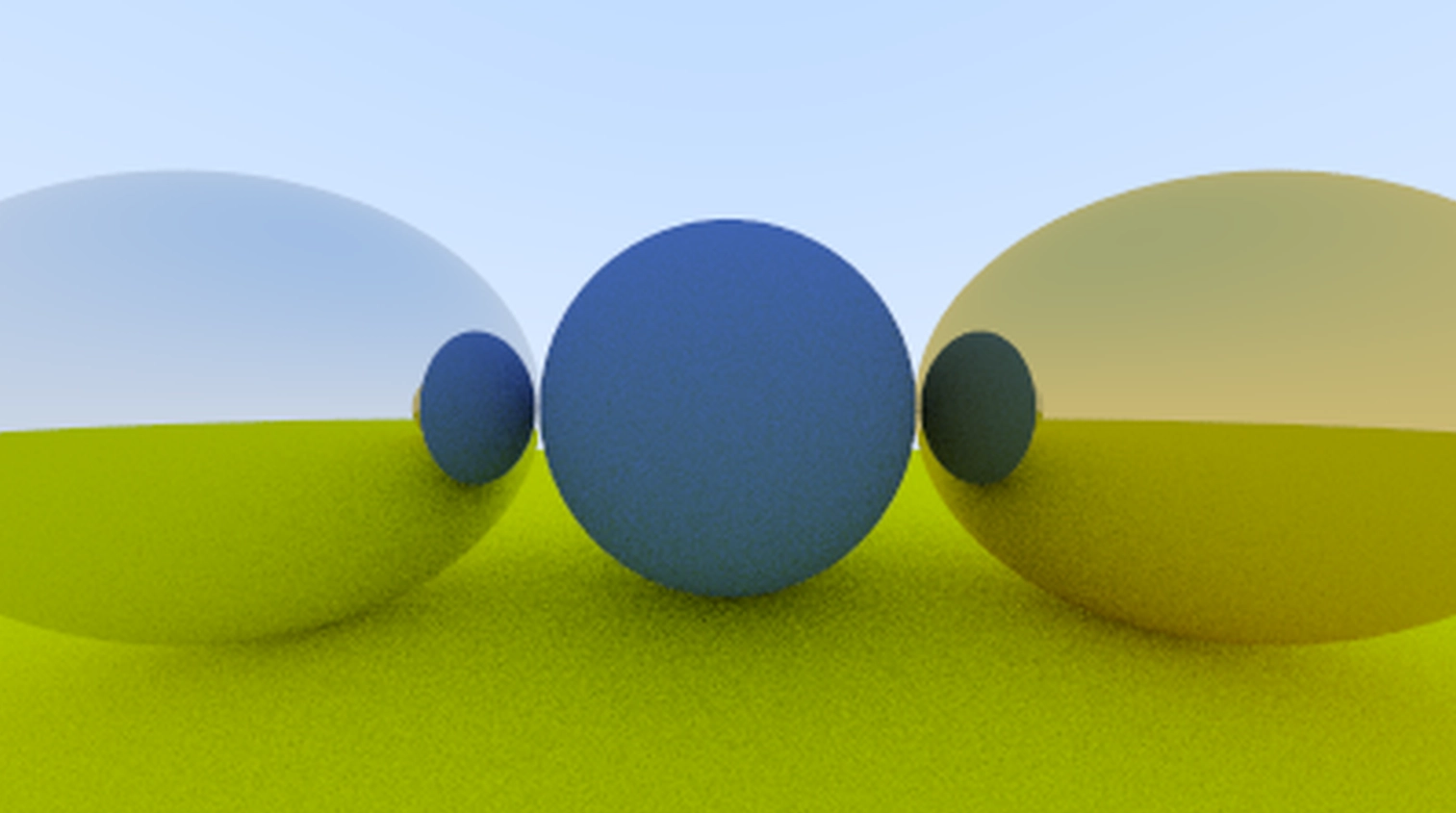
결과는 다음과 같습니다:
*이미지 13: 광택 있는 금속*
Fuzzy Reflection(부드러운 반사)
반사 방향을 무작위화할 수도 있습니다. 작은 구를 사용하여 광선의 새로운 끝점을 선택하는 방식입니다. 원래 끝점을 중심으로 하는 구의 표면에서 무작위 점을 선택하고, 이를 퍼지 계수(fuzz factor)로 스케일링합니다.
*그림 16: 퍼지 반사 광선 생성*
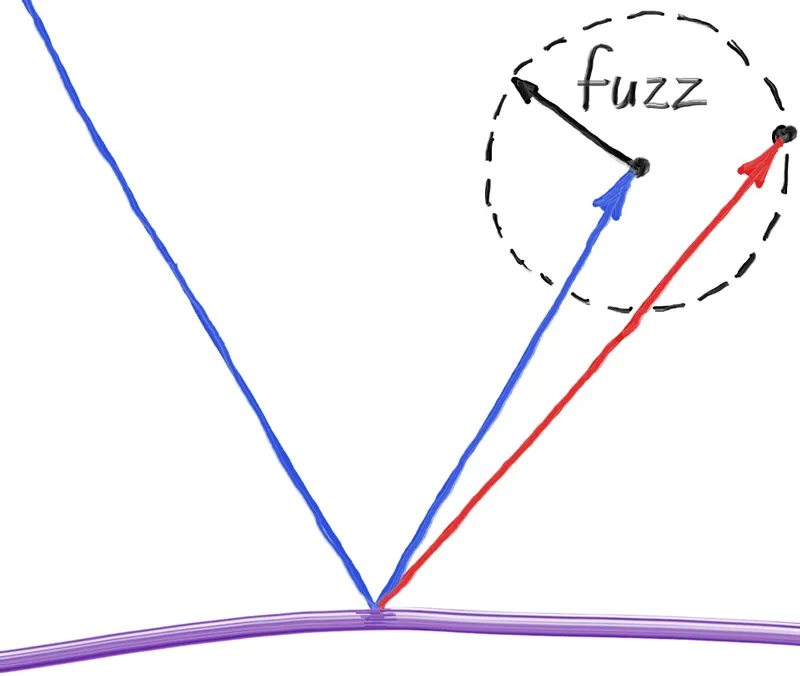
퍼지 구가 클수록 반사가 더 흐릿해집니다. 이는 구의 반지름을 퍼지니스 매개변수로 추가하는 것을 제안합니다. (0은 변동 없음). 문제는 큰 구나 스치듯 지나가는 광선의 경우, 표면 아래로 산란될 수 있다는 것입니다. 이 경우 표면이 광선을 흡수하도록 할 수 있습니다.
또한 퍼지 구가 의미를 갖기 위해서는, 임의의 길이로 변할 수 있는 반사 벡터와 비교하여 일관되게 스케일링되어야 합니다. 이를 해결하기 위해 반사된 광선을 정규화해야 합니다.
// Metal.h
class Metal : public Material
{
public:
Metal(const Color& albedo, double fuzz)
: mAlbedo(albedo)
, mFuzz(fuzz < 1 ? fuzz : 1)
{
}
bool Scatter(const Ray& rayIn, const HitRecord& hitRecord, Color& attenuation, Ray& scattered) const override
{
Vec3 reflected = Reflect(rayIn.Direction(), hitRecord.normal);
reflected = UnitVector(reflected) + (mFuzz * RandomUnitVector());
scattered = Ray(hitRecord.point, reflected);
attenuation = mAlbedo;
return (Dot(scattered.Direction(), hitRecord.normal) > 0);
}
private:
Color mAlbedo;
double mFuzz;
};
C++
복사
*리스팅 69: [material.h] 금속 재질 퍼지니스*
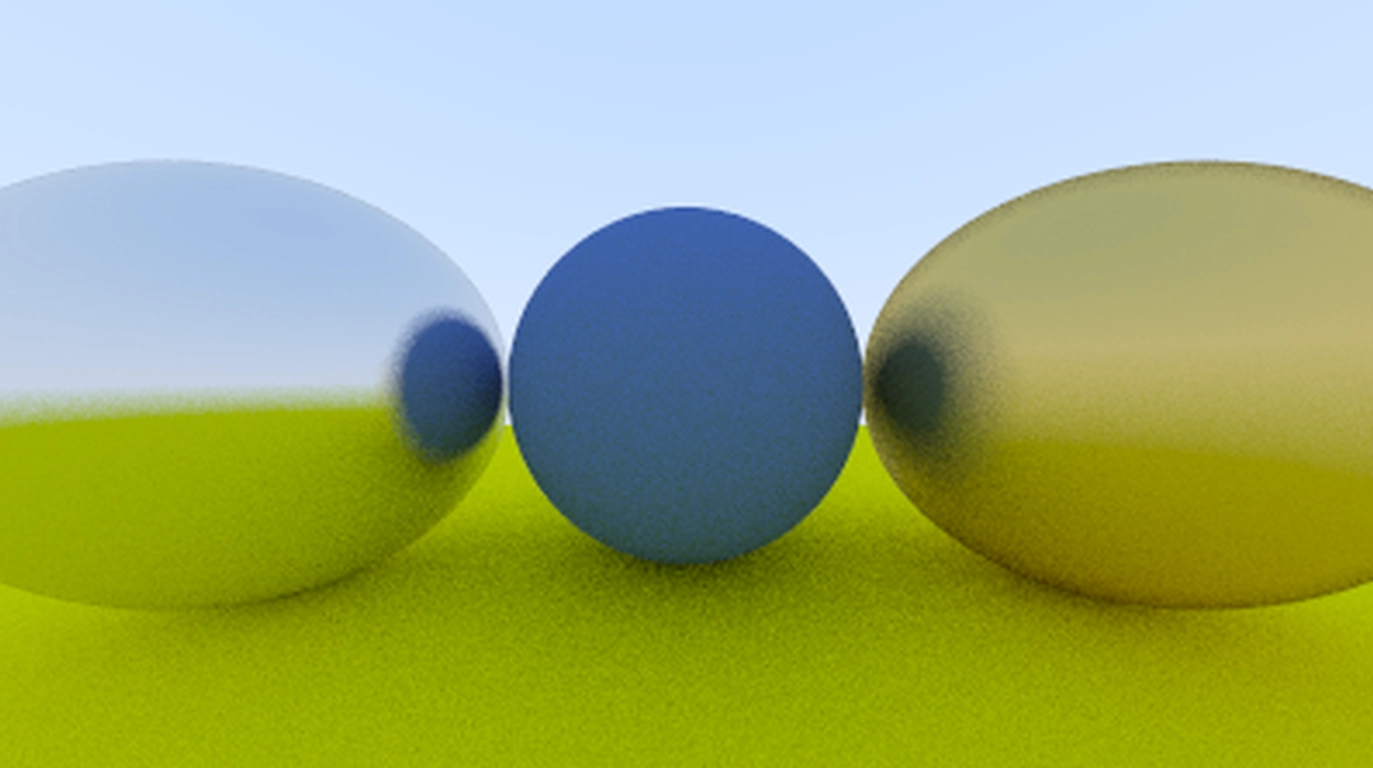
금속에 퍼지니스 0.3과 1.0을 추가하여 시도해볼 수 있습니다:
int main()
{
...
auto materialGround = std::make_shared<Lambertian>(Color(0.8, 0.8, 0.0));
auto materialCenter = std::make_shared<Lambertian>(Color(0.1, 0.2, 0.5));
auto materialLeft = std::make_shared<Metal>(Color(0.8, 0.8, 0.8), 0.3);
auto materialRight = std::make_shared<Metal>(Color(0.8, 0.6, 0.2), 1.0);
...
}
C++
복사
*이미지 14: 흐릿한 금속*